This month's release for TruffleHog Enterprise brings a redesigned homepage built around a new summary dashboard, alongside meaningful additions to TruffleHog GCP Analyze, which provides actionable context on GCP service account keys to understand risk and prioritize remediation. The dashboard gives you a fast read on secrets detection and remediation across your environment. The GCP Analyze updates push enrichment further and turn that enrichment into specific, actionable recommendations.
Summary Dashboard: A new homepage for TruffleHog Enterprise that surfaces the state of secrets detection and remediation at a glance.
GCP Analyze - IAM Insights and Recommendations: Least-privilege insights from GCP's Recommender API, surfaced directly in TruffleHog with severity, descriptions, and links into your GCP console.
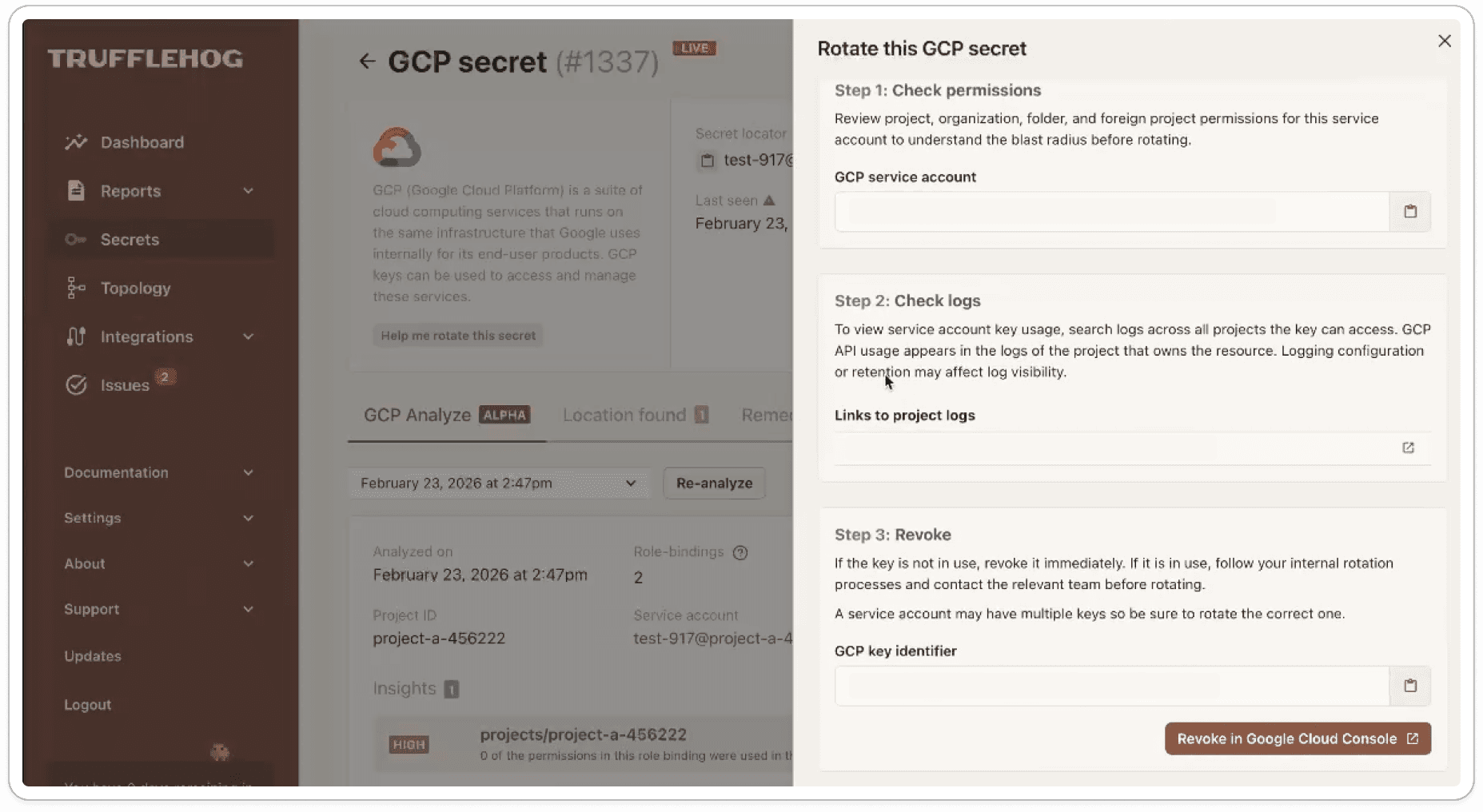
GCP Analyze - Guided Secret Rotation: A step-by-step rotation drawer launched from the secret details page, with the specific context needed to safely rotate a GCP credential.
GCP Analyze - Workflow improvements: A credential status indicator that confirms GCP Analyze is properly provisioned, and a new searchable, filterable table view of a credential's permissions alongside the existing node viewer.
Summary Dashboard
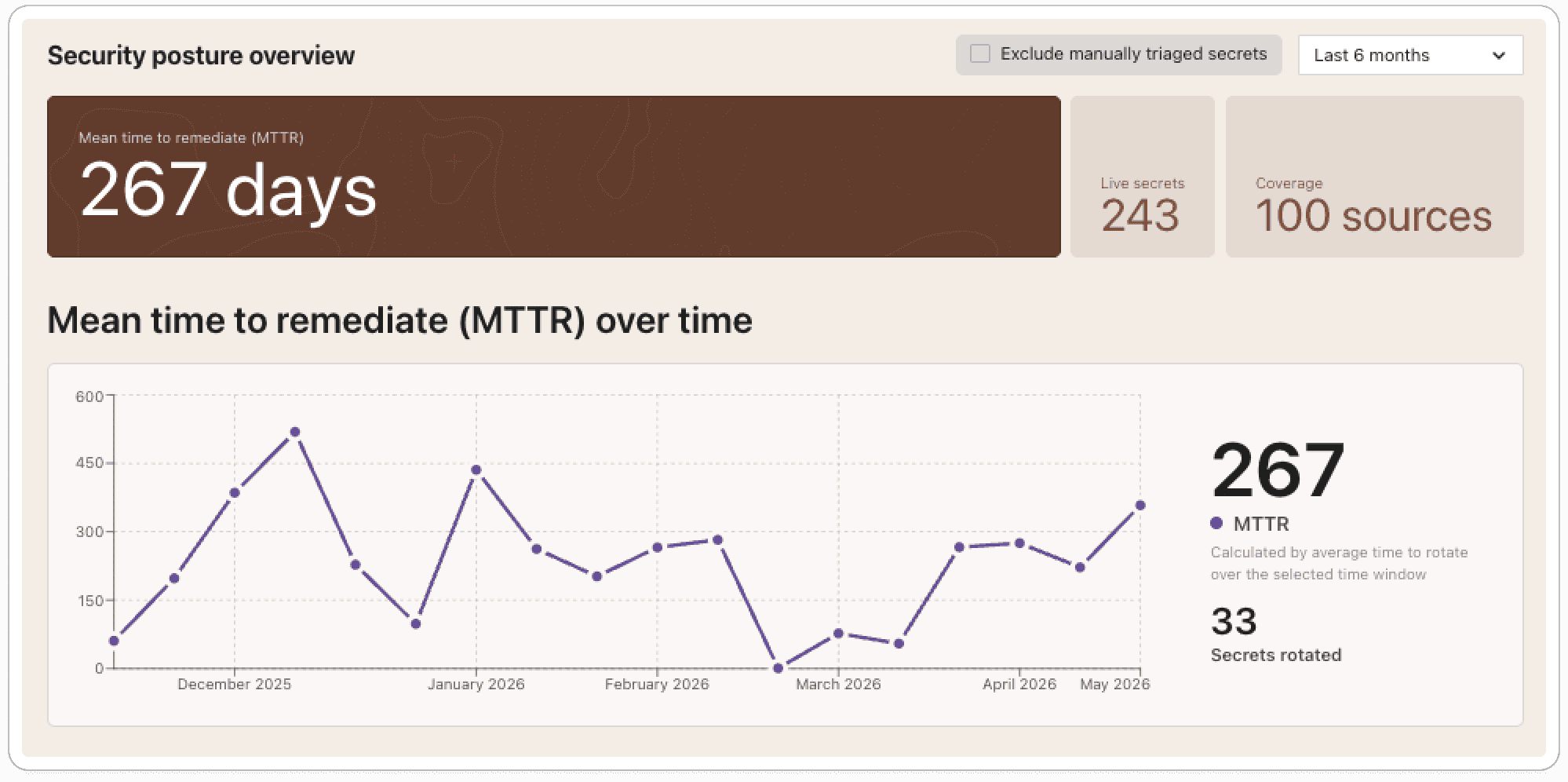
The new Summary Dashboard is the redesigned homepage of TruffleHog Enterprise. It gives you an immediate read on the state of secrets detection and remediation in your environment. Helpful to quickly determine how many live secrets exist right now, where they're coming from, how quickly your team is rotating them, and how the trend is moving over time.
What's new
The new components that make up the dashboard include:
Security posture overview
Mean time to remediate (MTTR), over time
Live secrets, over time
Live secrets by type
Live secrets by integration category
Top remediated integrations
Every chart and table is interactive. Clicking into any segment takes you to a pre-filtered view of the underlying secrets, ready to investigate.
The problem we're solving
Secret scanning is challenging across an enterprise. TruffleHog has been built to make that work easier, and our customers who run Truffle at scale generate a steady stream of high-fidelity secret findings as a result.
Secret findings live across multiple views and saved searches. Most tools measure success by what they find, pulling together a current read on the program, what's live, what's being handled, and how response is trending. This often means stitching that picture together by hand. The Summary Dashboard helps remove that step.
What's happening under the hood
The dashboard is built on the same verified, deduplicated data that powers the rest of TruffleHog Enterprise. Every secret reflected in the charts has been confirmed and duplicate findings of the same secret are collapsed into a single record.
MTTR is worth a brief explanation, since the definition matters. A secret that has been found but not revoked is still live, and rotation is the only action that eliminates the risk. For this reason, we calculate MTTR across rotated secrets only, measuring the time from initial detection to confirmed rotation and averaging across the reporting window you select (30 days, 60 days, 6 months, 12 months).
Each component is linked to a pre-filtered view, so clicking into a chart segment opens the right information quickly.
What this unlocks
Security teams have lots of priorities so when they launch TruffleHog they are greeted with findings that need attention. The Summary Dashboard makes those moments faster by surfacing the relevant context up front and providing routing to findings that require action. For security leaders, it is a way to move from reporting on findings to reporting on risk reduction.
GCP Analyze: richer context, clearer next steps
GCP Analyze enriches every GCP key finding with the context that determines its real impact: the permissions tied to the credential, the resources it can reach, and its place in the IAM hierarchy. This release adds two new layers of enrichment on top of that foundation, both focused on turning context into action. IAM Insights and Recommendations bring in least-privilege guidance from GCP itself, and Guided Secret Rotation extends enrichment into the rotation step, pulling the specific information needed to safely rotate a credential.
GCP Analyze - IAM Insights and Recommendations
What's new
IAM insights from GCP's Recommender API are now surfaced directly on the secret details page. Each insight includes a severity, a description, and a link into the GCP console to act on it.
The problem we're solving
Service Account Keys often carry far more access than they need. GCP exposes useful signal about over-privileged roles and risky bindings through its Recommender API, but acting on that signal usually requires bouncing between TruffleHog, the GCP console, and whatever scripts a team has built to enumerate findings.
What's happening under the hood
TruffleHog queries the GCP Recommender API for the credential under review and renders the relevant insights alongside the existing IAM hierarchy and metadata. Each recommendation carries its own severity classification and a direct link to the corresponding view in the GCP console.
What this unlocks
Least-privilege work that happens in the same place a credential is being reviewed. Users can understand over-privileged roles and recommend removal of excess authorization.
GCP Analyze - Guided Secret Rotation
What's new
Clicking Help me rotate on a GCP credential now opens a guided rotation drawer with the specific context needed for that credential, including the key identifier, links to relevant logs, and the surrounding metadata required to make the change safely.
The problem we're solving
When a GCP credential leaks, the fastest path to containment is rotation, but the details matter. A single service account can have multiple credentials attached to it, and rotating the wrong one can cause disruption that's avoidable with the right context. Static documentation can describe the general process, but it can't tell you which key you're looking at.
What's happening under the hood
Because GCP Analyze already has the full context on the credential, the rotation drawer pulls in the specifics: the exact key identifier, links to logs that show recent activity for that key, and the metadata needed to verify you're operating on the right credential.
What this unlocks
A meaningful reduction in time from "this credential needs to be rotated" to a confirmed rotation, with significantly less risk of touching the wrong key. The goal is to help teams shorten MTTR.
GCP Analyze - Workflow improvements
Two smaller updates round out the release.
Credential status indicator. GCP Analyze relies on a credential you provide in order to connect the analyze functionality. We now self-check that credential and surface its status in the integration view. If anything is missing or misconfigured, a modal explains what's wrong and a refresh option lets you revalidate on demand. The result is confidence that GCP Analyze is operating on a properly provisioned credential, with any issues caught up front.
Table view of permissions. The existing node viewer is well suited to exploring the shape of a credential's access across the Organization, Folder, and Project hierarchy. The new table view is built for pointed questions, like whether a credential carries a specific role or has access to a particular resource. It renders the same underlying access data, with search and filter controls on top and the ability to drill into the granular permissions on any row. Both views live side by side, so you can move between exploration and targeted investigation as the question changes.
All features are available now. For more information, visit https://trufflesecurity.com/trufflehog-enterprise