Google API Keys Weren't Secrets. But then Gemini Changed the Rules.
Joe Leon
February 25, 2026
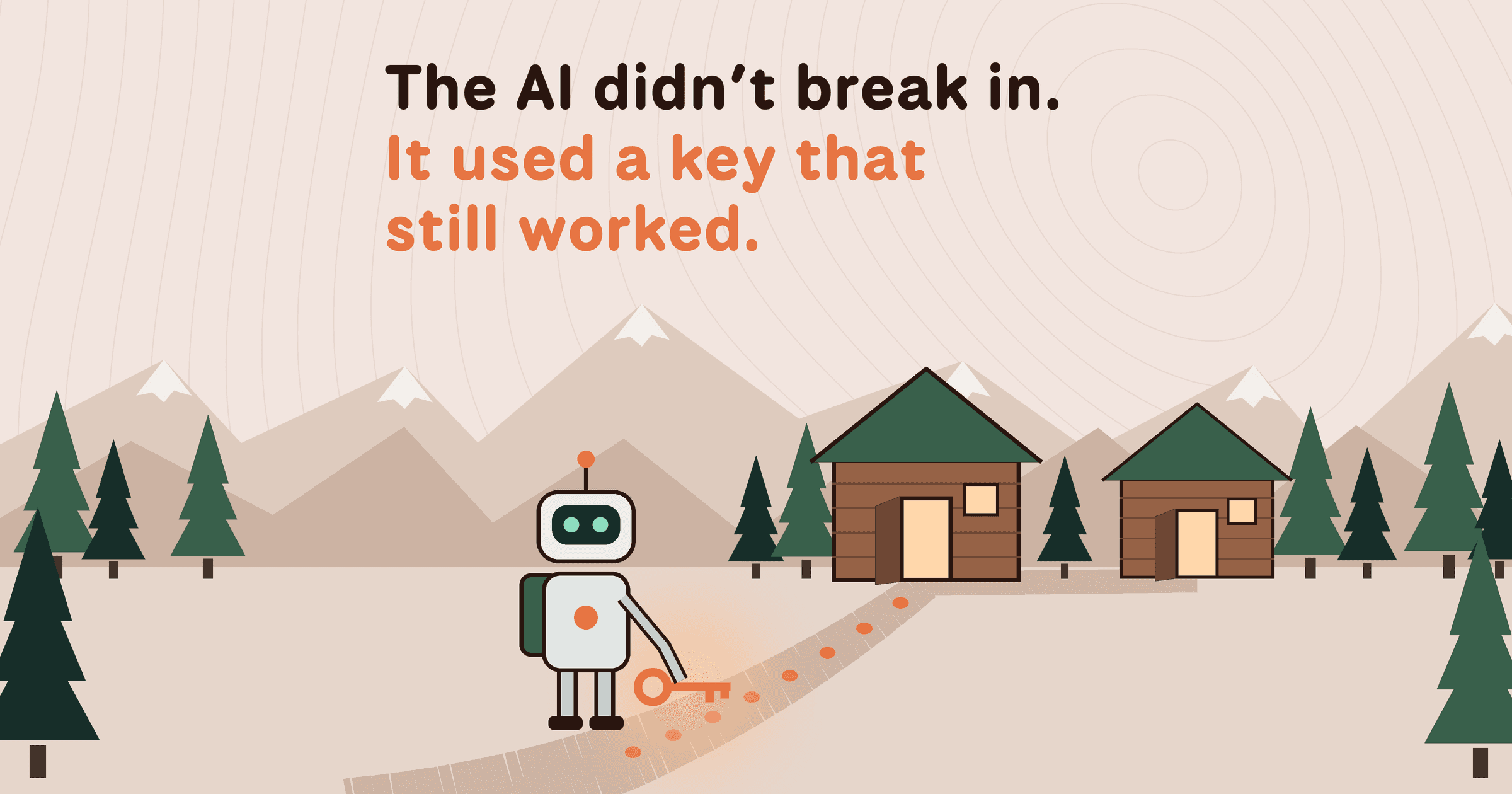
tl;dr Google spent over a decade telling developers that Google API keys (like those used in Maps, Firebase, etc.) are not secrets. But that's no longer true: Gemini accepts the same keys to access your private data. We scanned millions of websites and found nearly 3,000 Google API keys, originally deployed for public services like Google Maps, that now also authenticate to Gemini even though they were never intended for it. With a valid key, an attacker can access uploaded files, cached data, and charge LLM-usage to your account. Even Google themselves had old public API keys, which they thought were non-sensitive, that we could use to access Google’s internal Gemini.
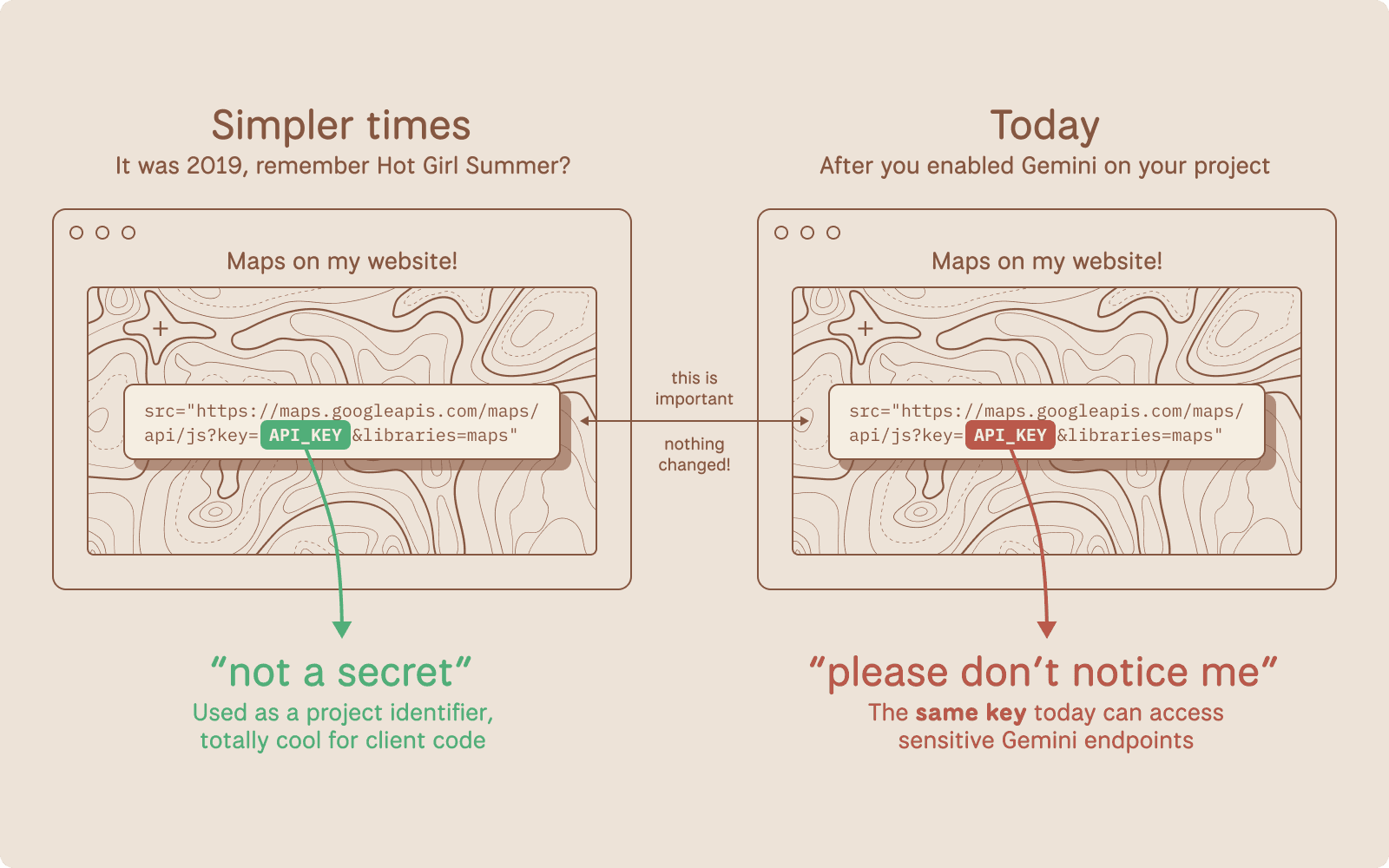
The Core Problem
Google Cloud uses a single API key format (AIza...) for two fundamentally different purposes: public identification and sensitive authentication.
For years, Google has explicitly told developers that API keys are safe to embed in client-side code. Firebase's own security checklist states that API keys are not secrets.
Note: these are distinctly different from Service Account JSON keys used to power GCP.
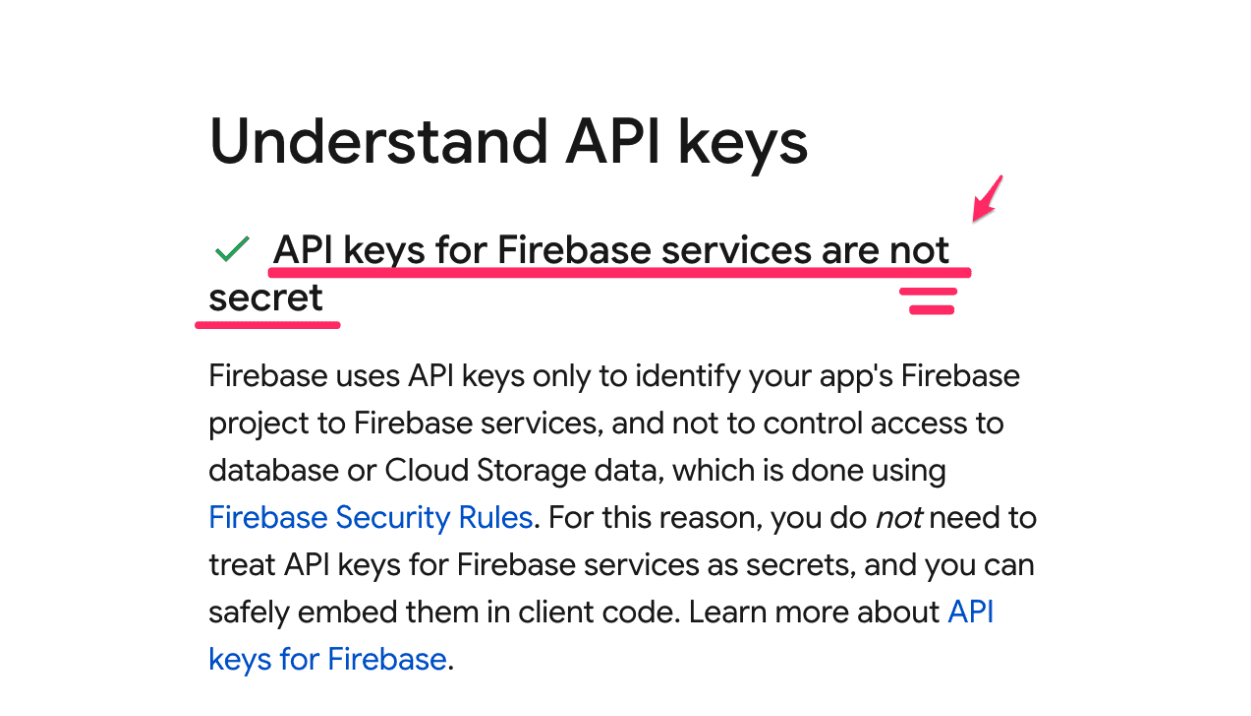
Source: https://firebase.google.com/support/guides/security-checklist#api-keys-not-secret
Google's Maps JavaScript documentation instructs developers to paste their key directly into HTML.
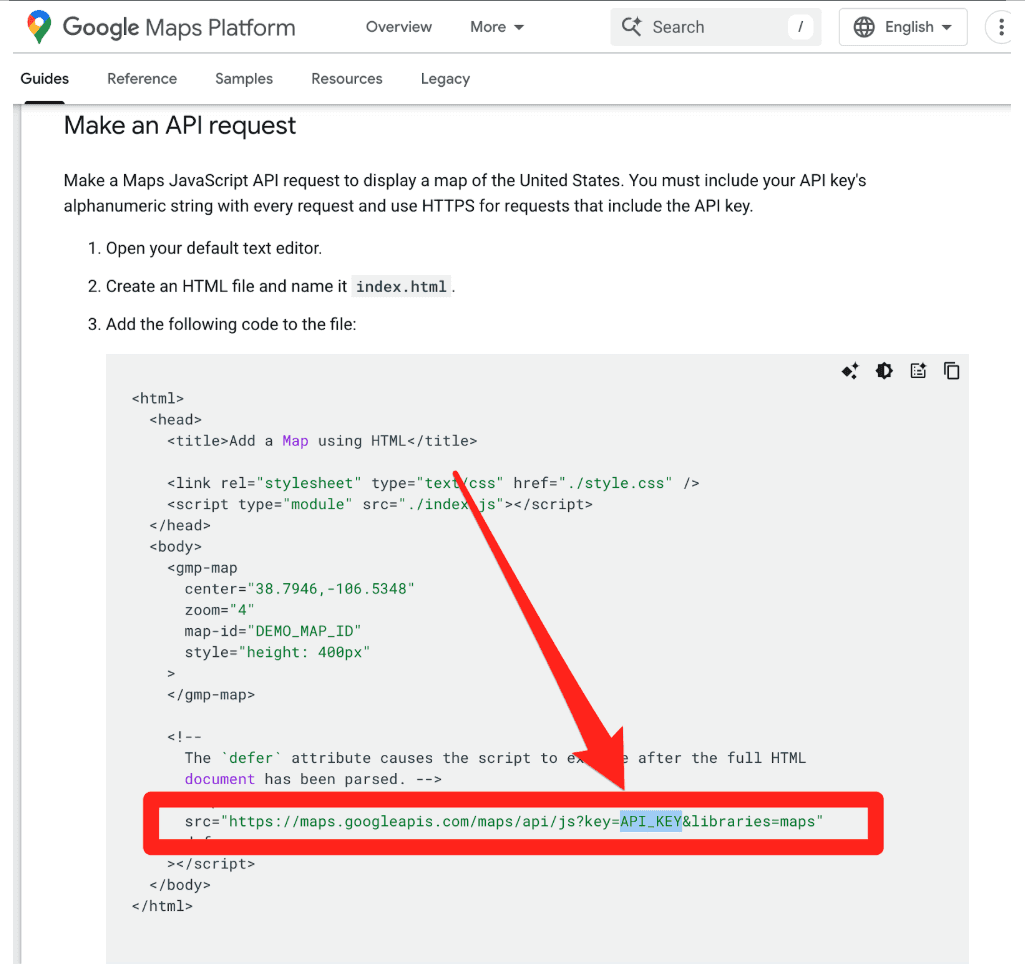
This makes sense. These keys were designed as project identifiers for billing, and can be further restricted with (bypassable) controls like HTTP referer allow-listing. They were not designed as authentication credentials.
Then Gemini arrived.
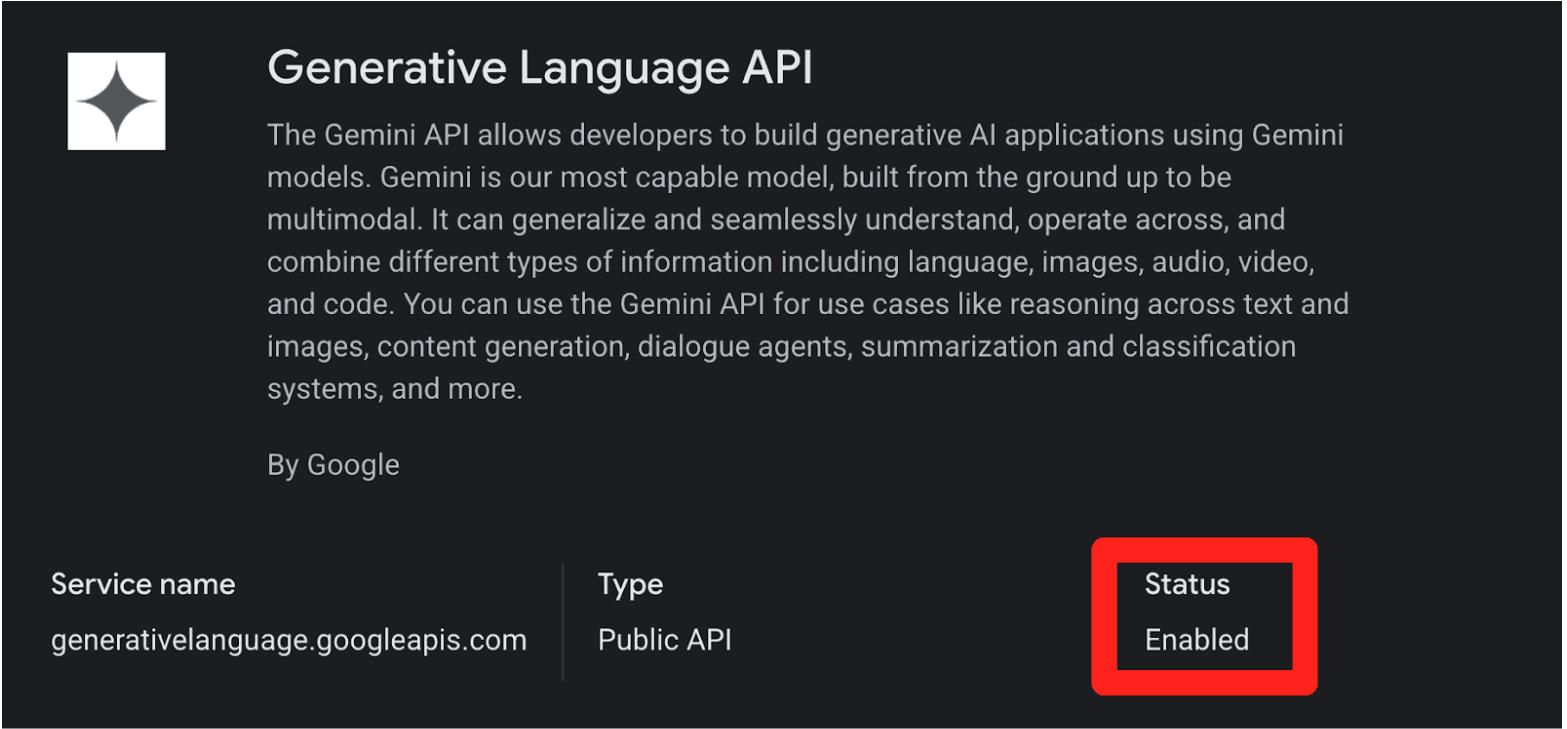
When you enable the Gemini API (Generative Language API) on a Google Cloud project, existing API keys in that project (including the ones sitting in public JavaScript on your website) can silently gain access to sensitive Gemini endpoints. No warning. No confirmation dialog. No email notification.
This creates two distinct problems:
Retroactive Privilege Expansion. You created a Maps key three years ago and embedded it in your website's source code, exactly as Google instructed. Last month, a developer on your team enabled the Gemini API for an internal prototype. Your public Maps key is now a Gemini credential. Anyone who scrapes it can access your uploaded files, cached content, and rack up your AI bill. Nobody told you.
Insecure Defaults. When you create a new API key in Google Cloud, it defaults to "Unrestricted," meaning it's immediately valid for every enabled API in the project, including Gemini. The UI shows a warning about "unauthorized use," but the architectural default is wide open.
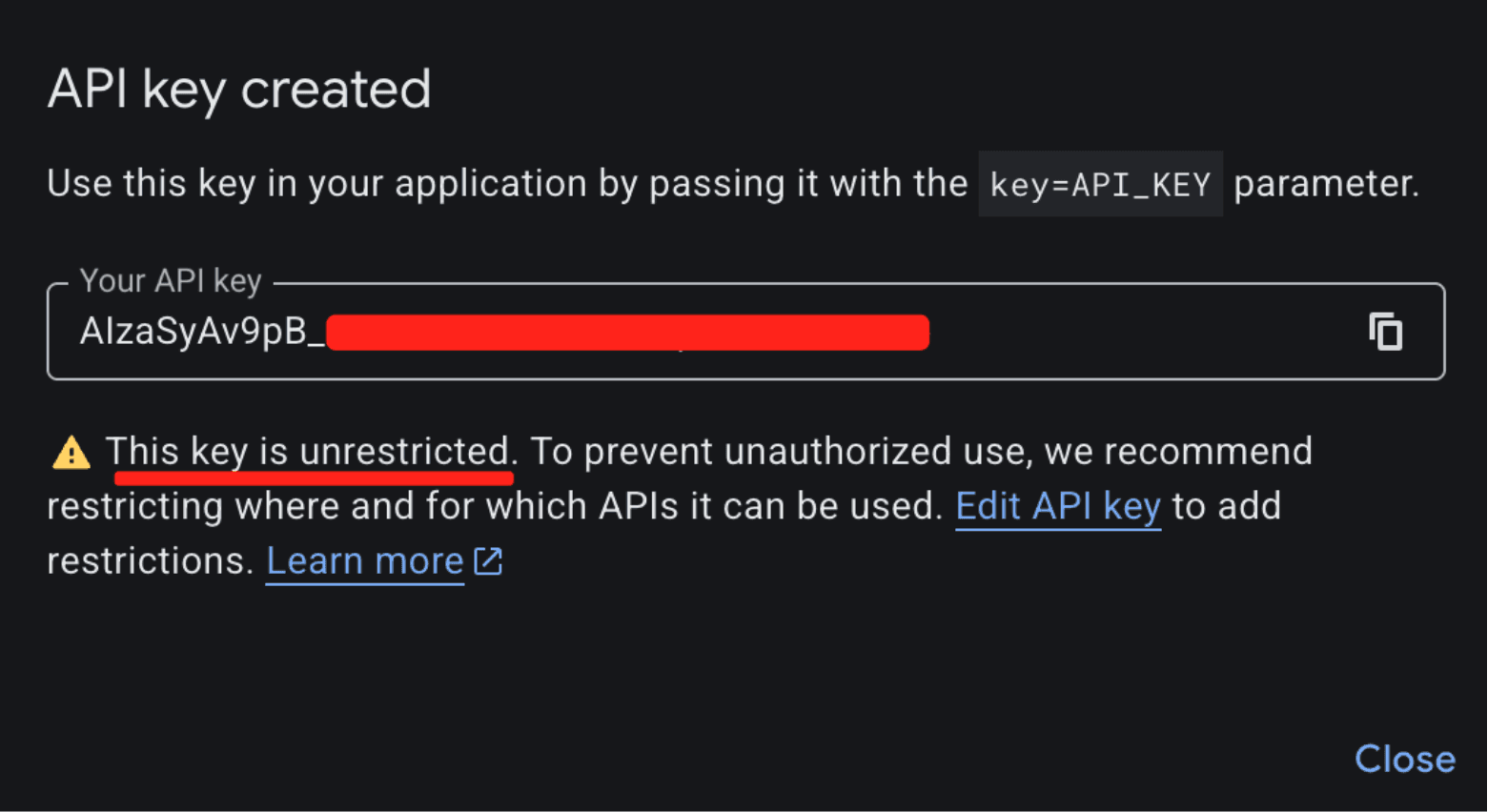
The result: thousands of API keys that were deployed as benign billing tokens are now live Gemini credentials sitting on the public internet.
What makes this a privilege escalation rather than a misconfiguration is the sequence of events.
A developer creates an API key and embeds it in a website for Maps. (At that point, the key is harmless.)
The Gemini API gets enabled on the same project. (Now that same key can access sensitive Gemini endpoints.)
The developer is never warned that the keys' privileges changed underneath it. (The key went from public identifier to secret credential).
While users can restrict Google API keys (by API service and application), the vulnerability lies in the Insecure Default posture (CWE-1188) and Incorrect Privilege Assignment (CWE-269):
Implicit Trust Upgrade: Google retroactively applied sensitive privileges to existing keys that were already rightfully deployed in public environments (e.g., JavaScript bundles).
Lack of Key Separation: Secure API design requires distinct keys for each environment (Publishable vs. Secret Keys). By relying on a single key format for both, the system invites compromise and confusion.
Failure of Safe Defaults: The default state of a generated key via the GCP API panel permits access to the sensitive Gemini API (assuming it’s enabled). A user creating a key for a map widget is unknowingly generating a credential capable of administrative actions.
What an Attacker Can Do
The attack is trivial. An attacker visits your website, views the page source, and copies your AIza... key from the Maps embed. Then they run:
curl "https://generativelanguage.googleapis.com/v1beta/files?key=$API_KEY"
Instead of a 403 Forbidden, they get a 200 OK. From here, the attacker can:
Access private data. The
/files/and/cachedContents/endpoints can contain uploaded datasets, documents, and cached context. Anything the project owner stored through the Gemini API is accessible.Run up your bill. Gemini API usage isn't free. Depending on the model and context window, a threat actor maxing out API calls could generate thousands of dollars in charges per day on a single victim account.
Exhaust your quotas. This could shut down your legitimate Gemini services entirely.
The attacker never touches your infrastructure. They just scrape a key from a public webpage.
2,863 Live Keys on the Public Internet
To understand the scale of this issue, we scanned the November 2025 Common Crawl dataset, a massive (~700 TiB) archive of publicly scraped webpages containing HTML, JavaScript, and CSS from across the internet. We identified 2,863 live Google API keys vulnerable to this privilege-escalation vector.

Example Google API key in front-end source code used for Google Maps, but also can access Gemini
These aren't just hobbyist side projects. The victims included major financial institutions, security companies, global recruiting firms, and, notably, Google itself. If the vendor's own engineering teams can't avoid this trap, expecting every developer to navigate it correctly is unrealistic.
Proof of Concept: Google's Own Keys
We provided Google with concrete examples from their own infrastructure to demonstrate the issue. One of the keys we tested was embedded in the page source of a Google product's public-facing website. By checking the Internet Archive, we confirmed this key had been publicly deployed since at least February 2023, well before the Gemini API existed. There was no client-side logic on the page attempting to access any Gen AI endpoints. It was used solely as a public project identifier, which is standard for Google services.
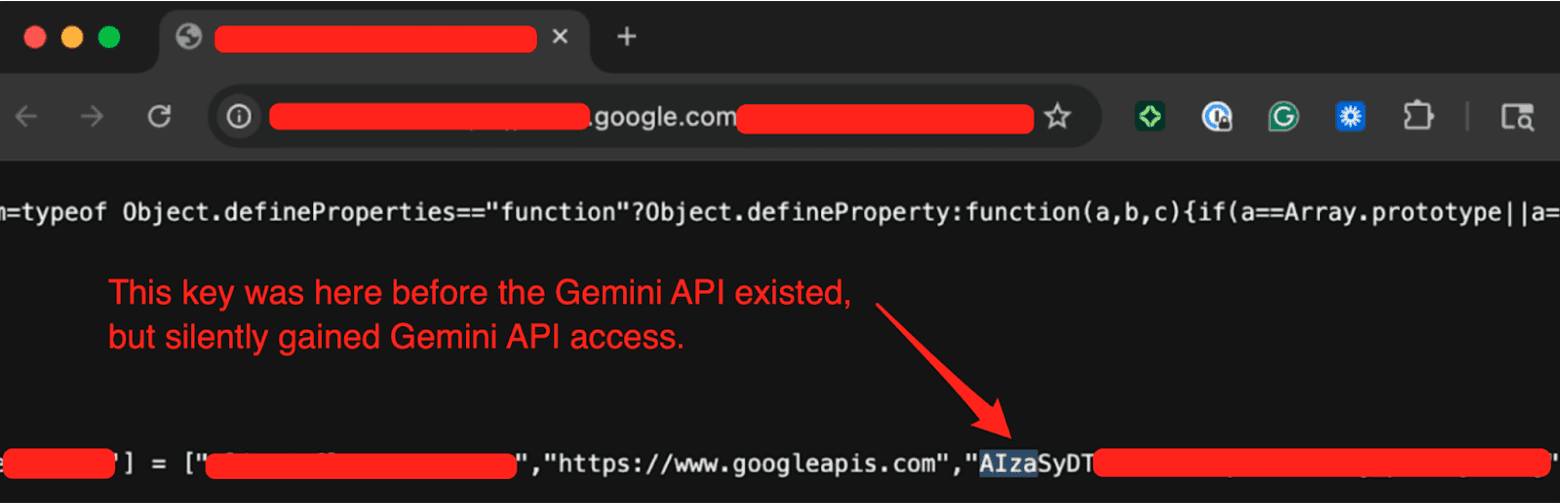
We tested the key by hitting the Gemini API's /models endpoint (which Google confirmed was in-scope) and got a 200 OK response listing available models. A key that was deployed years ago for a completely benign purpose had silently gained full access to a sensitive API without any developer intervention.
The Disclosure Timeline
We reported this to Google through their Vulnerability Disclosure Program on November 21, 2025.
Nov 21, 2025: We submitted the report to Google's VDP.
Nov 25, 2025: Google initially determined this behavior was intended. We pushed back.
Dec 1, 2025: After we provided examples from Google's own infrastructure (including keys on Google product websites), the issue gained traction internally.
Dec 2, 2025: Google reclassified the report from "Customer Issue" to "Bug," upgraded the severity, and confirmed the product team was evaluating a fix. They requested the full list of 2,863 exposed keys, which we provided.
Dec 12, 2025: Google shared their remediation plan. They confirmed an internal pipeline to discover leaked keys, began restricting exposed keys from accessing the Gemini API, and committed to addressing the root cause before our disclosure date.
Jan 13, 2026: Google classified the vulnerability as "Single-Service Privilege Escalation, READ" (Tier 1).
Feb 2, 2026: Google confirmed the team was still working on the root-cause fix.
Feb 19, 2026: 90 Day Disclosure Window End.
Credit Where It's Due
Transparently, the initial triage was frustrating; the report was dismissed as "Intended Behavior”. But after providing concrete evidence from Google's own infrastructure, the GCP VDP team took the issue seriously.
They expanded their leaked-credential detection pipeline to cover the keys we reported, thereby proactively protecting real Google customers from threat actors exploiting their Gemini API keys. They also committed to fixing the root cause, though we haven't seen a concrete outcome yet.
Building software at Google's scale is extraordinarily difficult, and the Gemini API inherited a key management architecture built for a different era. Google recognized the problem we reported and took meaningful steps. The open questions are whether Google will inform customers of the security risks associated with their existing keys and whether Gemini will eventually adopt a different authentication architecture.
Where Google Says They're Headed
Google publicly documented its roadmap. This is what it says:
Scoped defaults. New keys created through AI Studio will default to Gemini-only access, preventing unintended cross-service usage.
Leaked key blocking. They are defaulting to blocking API keys that are discovered as leaked and used with the Gemini API.
Proactive notification. They plan to communicate proactively when they identify leaked keys, prompting immediate action.
These are meaningful improvements, and some are clearly already underway. We'd love to see Google go further and retroactively audit existing impacted keys and notify project owners who may be unknowingly exposed, but honestly, that is a monumental task.
What You Should Do Right Now
If you use Google Cloud (or any of its services like Maps, Firebase, YouTube, etc), the first thing to do is figure out whether you're exposed. Here's how.
Step 1: Check every GCP project for the Generative Language API.
Go to the GCP console, navigate to APIs & Services > Enabled APIs & Services, and look for the "Generative Language API." Do this for every project in your organization. If it's not enabled, you're not affected by this specific issue.
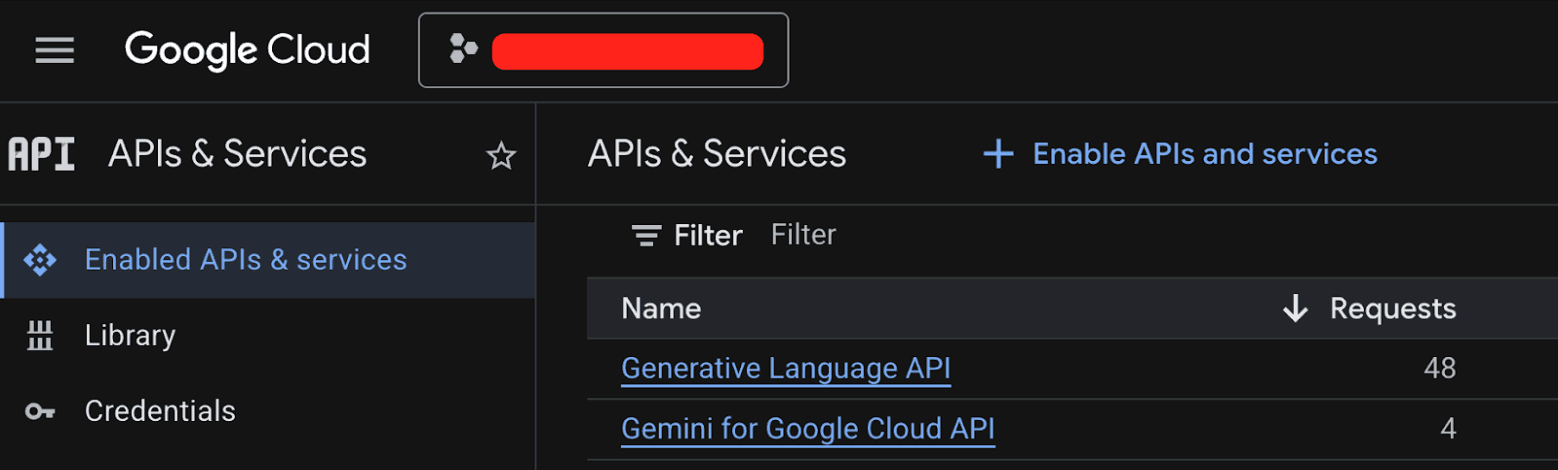
Step 2: If the Generative Language API is enabled, audit your API keys.
Navigate to APIs & Services > Credentials. Check each API key's configuration. You're looking for two types of keys:
Keys that have a warning icon, meaning they are set to unrestricted
Keys that explicitly list the Generative Language API in their allowed services
Either configuration allows the key to access Gemini.
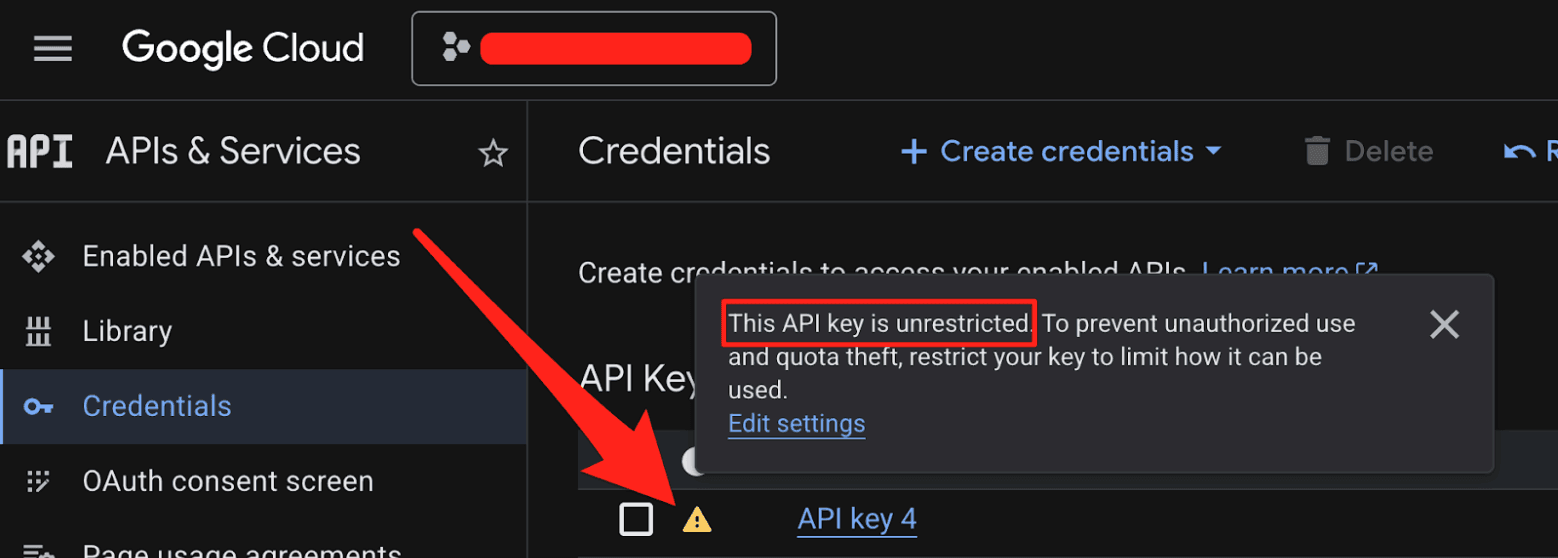
Step 3: Verify none of those keys are public.
This is the critical step. If a key with Gemini access is embedded in client-side JavaScript, checked into a public repository, or otherwise exposed on the internet, you have a problem. Start with your oldest keys first. Those are the most likely to have been deployed publicly under the old guidance that API keys are safe to share, and then retroactively gained Gemini privileges when someone on your team enabled the API.
If you find an exposed key, rotate it.
Bonus: Scan with TruffleHog.
You can also use TruffleHog to scan your code, CI/CD pipelines, and web assets for leaked Google API keys. TruffleHog will verify whether discovered keys are live and have Gemini access, so you'll know exactly which keys are exposed and active, not just which ones match a regular expression.
trufflehog filesystem /path/to/your/code --only-verifiedThe pattern we uncovered here (public identifiers quietly gaining sensitive privileges) isn't unique to Google. As more organizations bolt AI capabilities onto existing platforms, the attack surface for legacy credentials expands in ways nobody anticipated.
Additional Resources
Webinar: Google API Keys Weren't Secrets. But then Gemini Changed the Rules.
tl;dr Google spent over a decade telling developers that Google API keys (like those used in Maps, Firebase, etc.) are not secrets. But that's no longer true: Gemini accepts the same keys to access your private data. We scanned millions of websites and found nearly 3,000 Google API keys, originally deployed for public services like Google Maps, that now also authenticate to Gemini even though they were never intended for it. With a valid key, an attacker can access uploaded files, cached data, and charge LLM-usage to your account. Even Google themselves had old public API keys, which they thought were non-sensitive, that we could use to access Google’s internal Gemini.

The Core Problem
Google Cloud uses a single API key format (AIza...) for two fundamentally different purposes: public identification and sensitive authentication.
For years, Google has explicitly told developers that API keys are safe to embed in client-side code. Firebase's own security checklist states that API keys are not secrets.
Note: these are distinctly different from Service Account JSON keys used to power GCP.

Source: https://firebase.google.com/support/guides/security-checklist#api-keys-not-secret
Google's Maps JavaScript documentation instructs developers to paste their key directly into HTML.

This makes sense. These keys were designed as project identifiers for billing, and can be further restricted with (bypassable) controls like HTTP referer allow-listing. They were not designed as authentication credentials.
Then Gemini arrived.

When you enable the Gemini API (Generative Language API) on a Google Cloud project, existing API keys in that project (including the ones sitting in public JavaScript on your website) can silently gain access to sensitive Gemini endpoints. No warning. No confirmation dialog. No email notification.
This creates two distinct problems:
Retroactive Privilege Expansion. You created a Maps key three years ago and embedded it in your website's source code, exactly as Google instructed. Last month, a developer on your team enabled the Gemini API for an internal prototype. Your public Maps key is now a Gemini credential. Anyone who scrapes it can access your uploaded files, cached content, and rack up your AI bill. Nobody told you.
Insecure Defaults. When you create a new API key in Google Cloud, it defaults to "Unrestricted," meaning it's immediately valid for every enabled API in the project, including Gemini. The UI shows a warning about "unauthorized use," but the architectural default is wide open.

The result: thousands of API keys that were deployed as benign billing tokens are now live Gemini credentials sitting on the public internet.
What makes this a privilege escalation rather than a misconfiguration is the sequence of events.
A developer creates an API key and embeds it in a website for Maps. (At that point, the key is harmless.)
The Gemini API gets enabled on the same project. (Now that same key can access sensitive Gemini endpoints.)
The developer is never warned that the keys' privileges changed underneath it. (The key went from public identifier to secret credential).
While users can restrict Google API keys (by API service and application), the vulnerability lies in the Insecure Default posture (CWE-1188) and Incorrect Privilege Assignment (CWE-269):
Implicit Trust Upgrade: Google retroactively applied sensitive privileges to existing keys that were already rightfully deployed in public environments (e.g., JavaScript bundles).
Lack of Key Separation: Secure API design requires distinct keys for each environment (Publishable vs. Secret Keys). By relying on a single key format for both, the system invites compromise and confusion.
Failure of Safe Defaults: The default state of a generated key via the GCP API panel permits access to the sensitive Gemini API (assuming it’s enabled). A user creating a key for a map widget is unknowingly generating a credential capable of administrative actions.
What an Attacker Can Do
The attack is trivial. An attacker visits your website, views the page source, and copies your AIza... key from the Maps embed. Then they run:
curl "https://generativelanguage.googleapis.com/v1beta/files?key=$API_KEY"
Instead of a 403 Forbidden, they get a 200 OK. From here, the attacker can:
Access private data. The
/files/and/cachedContents/endpoints can contain uploaded datasets, documents, and cached context. Anything the project owner stored through the Gemini API is accessible.Run up your bill. Gemini API usage isn't free. Depending on the model and context window, a threat actor maxing out API calls could generate thousands of dollars in charges per day on a single victim account.
Exhaust your quotas. This could shut down your legitimate Gemini services entirely.
The attacker never touches your infrastructure. They just scrape a key from a public webpage.
2,863 Live Keys on the Public Internet
To understand the scale of this issue, we scanned the November 2025 Common Crawl dataset, a massive (~700 TiB) archive of publicly scraped webpages containing HTML, JavaScript, and CSS from across the internet. We identified 2,863 live Google API keys vulnerable to this privilege-escalation vector.

Example Google API key in front-end source code used for Google Maps, but also can access Gemini
These aren't just hobbyist side projects. The victims included major financial institutions, security companies, global recruiting firms, and, notably, Google itself. If the vendor's own engineering teams can't avoid this trap, expecting every developer to navigate it correctly is unrealistic.
Proof of Concept: Google's Own Keys
We provided Google with concrete examples from their own infrastructure to demonstrate the issue. One of the keys we tested was embedded in the page source of a Google product's public-facing website. By checking the Internet Archive, we confirmed this key had been publicly deployed since at least February 2023, well before the Gemini API existed. There was no client-side logic on the page attempting to access any Gen AI endpoints. It was used solely as a public project identifier, which is standard for Google services.

We tested the key by hitting the Gemini API's /models endpoint (which Google confirmed was in-scope) and got a 200 OK response listing available models. A key that was deployed years ago for a completely benign purpose had silently gained full access to a sensitive API without any developer intervention.
The Disclosure Timeline
We reported this to Google through their Vulnerability Disclosure Program on November 21, 2025.
Nov 21, 2025: We submitted the report to Google's VDP.
Nov 25, 2025: Google initially determined this behavior was intended. We pushed back.
Dec 1, 2025: After we provided examples from Google's own infrastructure (including keys on Google product websites), the issue gained traction internally.
Dec 2, 2025: Google reclassified the report from "Customer Issue" to "Bug," upgraded the severity, and confirmed the product team was evaluating a fix. They requested the full list of 2,863 exposed keys, which we provided.
Dec 12, 2025: Google shared their remediation plan. They confirmed an internal pipeline to discover leaked keys, began restricting exposed keys from accessing the Gemini API, and committed to addressing the root cause before our disclosure date.
Jan 13, 2026: Google classified the vulnerability as "Single-Service Privilege Escalation, READ" (Tier 1).
Feb 2, 2026: Google confirmed the team was still working on the root-cause fix.
Feb 19, 2026: 90 Day Disclosure Window End.
Credit Where It's Due
Transparently, the initial triage was frustrating; the report was dismissed as "Intended Behavior”. But after providing concrete evidence from Google's own infrastructure, the GCP VDP team took the issue seriously.
They expanded their leaked-credential detection pipeline to cover the keys we reported, thereby proactively protecting real Google customers from threat actors exploiting their Gemini API keys. They also committed to fixing the root cause, though we haven't seen a concrete outcome yet.
Building software at Google's scale is extraordinarily difficult, and the Gemini API inherited a key management architecture built for a different era. Google recognized the problem we reported and took meaningful steps. The open questions are whether Google will inform customers of the security risks associated with their existing keys and whether Gemini will eventually adopt a different authentication architecture.
Where Google Says They're Headed
Google publicly documented its roadmap. This is what it says:
Scoped defaults. New keys created through AI Studio will default to Gemini-only access, preventing unintended cross-service usage.
Leaked key blocking. They are defaulting to blocking API keys that are discovered as leaked and used with the Gemini API.
Proactive notification. They plan to communicate proactively when they identify leaked keys, prompting immediate action.
These are meaningful improvements, and some are clearly already underway. We'd love to see Google go further and retroactively audit existing impacted keys and notify project owners who may be unknowingly exposed, but honestly, that is a monumental task.
What You Should Do Right Now
If you use Google Cloud (or any of its services like Maps, Firebase, YouTube, etc), the first thing to do is figure out whether you're exposed. Here's how.
Step 1: Check every GCP project for the Generative Language API.
Go to the GCP console, navigate to APIs & Services > Enabled APIs & Services, and look for the "Generative Language API." Do this for every project in your organization. If it's not enabled, you're not affected by this specific issue.

Step 2: If the Generative Language API is enabled, audit your API keys.
Navigate to APIs & Services > Credentials. Check each API key's configuration. You're looking for two types of keys:
Keys that have a warning icon, meaning they are set to unrestricted
Keys that explicitly list the Generative Language API in their allowed services
Either configuration allows the key to access Gemini.

Step 3: Verify none of those keys are public.
This is the critical step. If a key with Gemini access is embedded in client-side JavaScript, checked into a public repository, or otherwise exposed on the internet, you have a problem. Start with your oldest keys first. Those are the most likely to have been deployed publicly under the old guidance that API keys are safe to share, and then retroactively gained Gemini privileges when someone on your team enabled the API.
If you find an exposed key, rotate it.
Bonus: Scan with TruffleHog.
You can also use TruffleHog to scan your code, CI/CD pipelines, and web assets for leaked Google API keys. TruffleHog will verify whether discovered keys are live and have Gemini access, so you'll know exactly which keys are exposed and active, not just which ones match a regular expression.
trufflehog filesystem /path/to/your/code --only-verifiedThe pattern we uncovered here (public identifiers quietly gaining sensitive privileges) isn't unique to Google. As more organizations bolt AI capabilities onto existing platforms, the attack surface for legacy credentials expands in ways nobody anticipated.
Additional Resources
Webinar: Google API Keys Weren't Secrets. But then Gemini Changed the Rules.
Thoughts, research findings, reports, and more from Truffle Security Co.
The Dig
Thoughts, research findings, reports, and more from Truffle Security Co.
STAY STRONG
DIG DEEP
DOING IT THE RIGHT WAY
© 2025 Truffle Security Co.
STAY STRONG
DIG DEEP
© 2025 Truffle Security Co.


