tl;dr TruffleHog AWS Analyze identifies the AWS IAM principal behind a leaked access key and brings its identity policies and potential role paths into one view. Security teams get more context to assess risk and prioritize remediation within TruffleHog Enterprise.
Finding a leaked AWS key is only the beginning. Once the alert arrives, someone still has to work out who owns the key, what it can do, and whether rotating it will break something important.
That investigation gets messy. An IAM user key can inherit user and group policies, then open potential paths to other roles. As agentic workflows use more cloud credentials, keeping track of where those keys end up only gets harder.
AWS Analyze reduces that IAM legwork. It adds an AWS-specific view alongside TruffleHog Analyze for SaaS and GCP Analyze, helping multi-cloud teams investigate leaked credentials from TruffleHog Enterprise.
Leaked AWS keys stay active for years
In research prepared for this launch, our team re-checked 64,024 AWS keys found in public code, container images, and datasets. 88% were still active. The median key had been active for five years, and only 14% had ever been rotated.
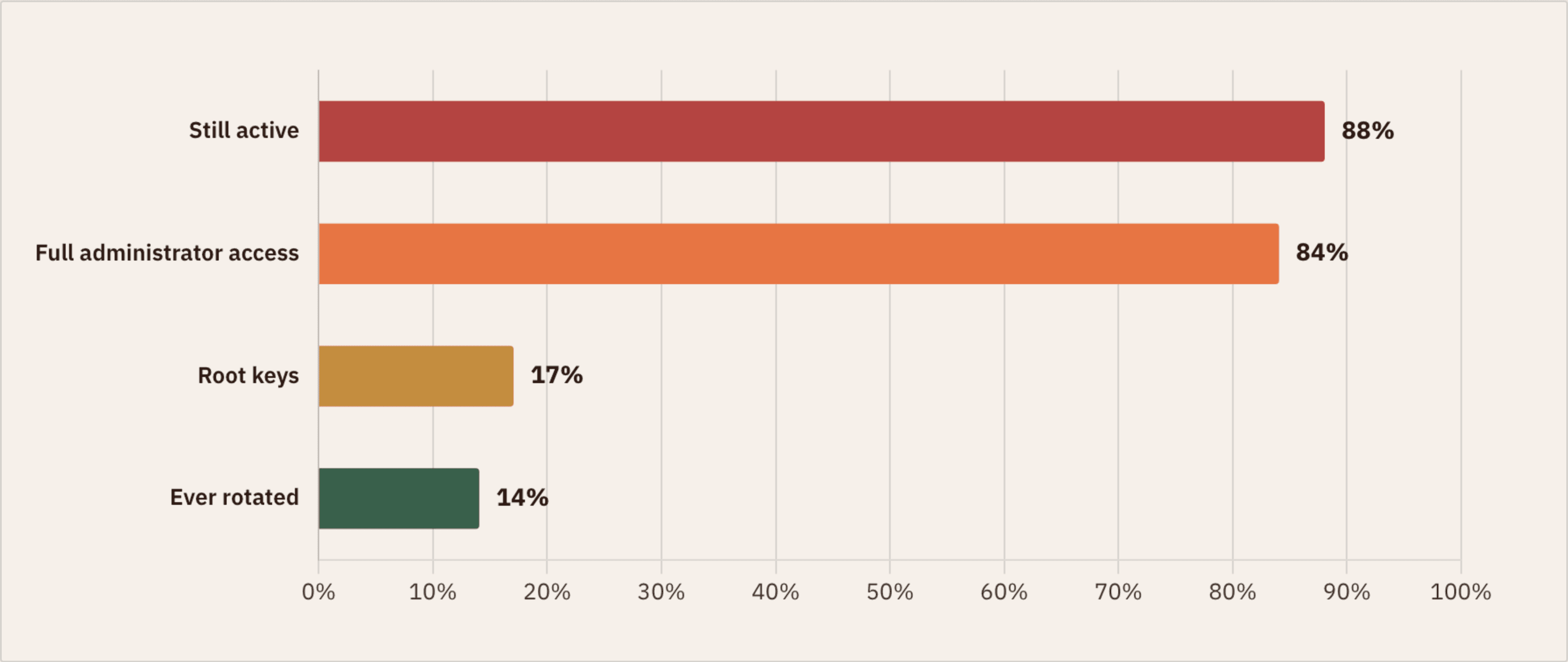
Status of 64,024 leaked AWS keys on re-check. Percentages are of the keys we could examine closely.
The access behind those keys was often broad. Among the keys we could examine closely, 84% had full administrator access and 1 in 6 was a root key. Another 929 had been flagged by AWS's compromised-key quarantine policy, some more than three years earlier, yet every one still authenticated.
We found the same pattern when TruffleHog scanned 7.6 petabytes of public AI training data on Hugging Face. The scan uncovered 3,343 live AWS keys. More than 900 could list S3 buckets containing at least 51.7 TB of private data.
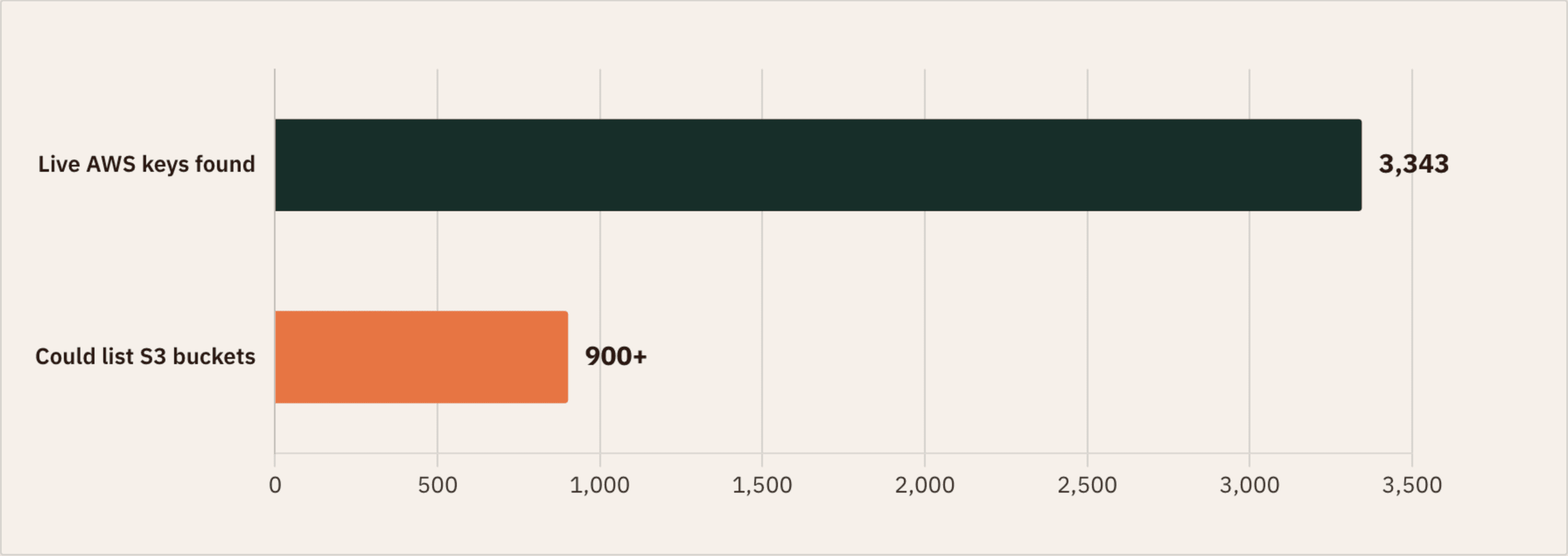
From the 7.6-petabyte Hugging Face scan: live AWS keys, and how many could enumerate private S3 storage.
An alert tells you a key leaked. Context tells you what to do next.
Whose key is it?
AWS Analyze resolves the caller's account and IAM principal type. For IAM users, it also retrieves groups and tags when available.
Finding the identity is the first step toward fixing it.
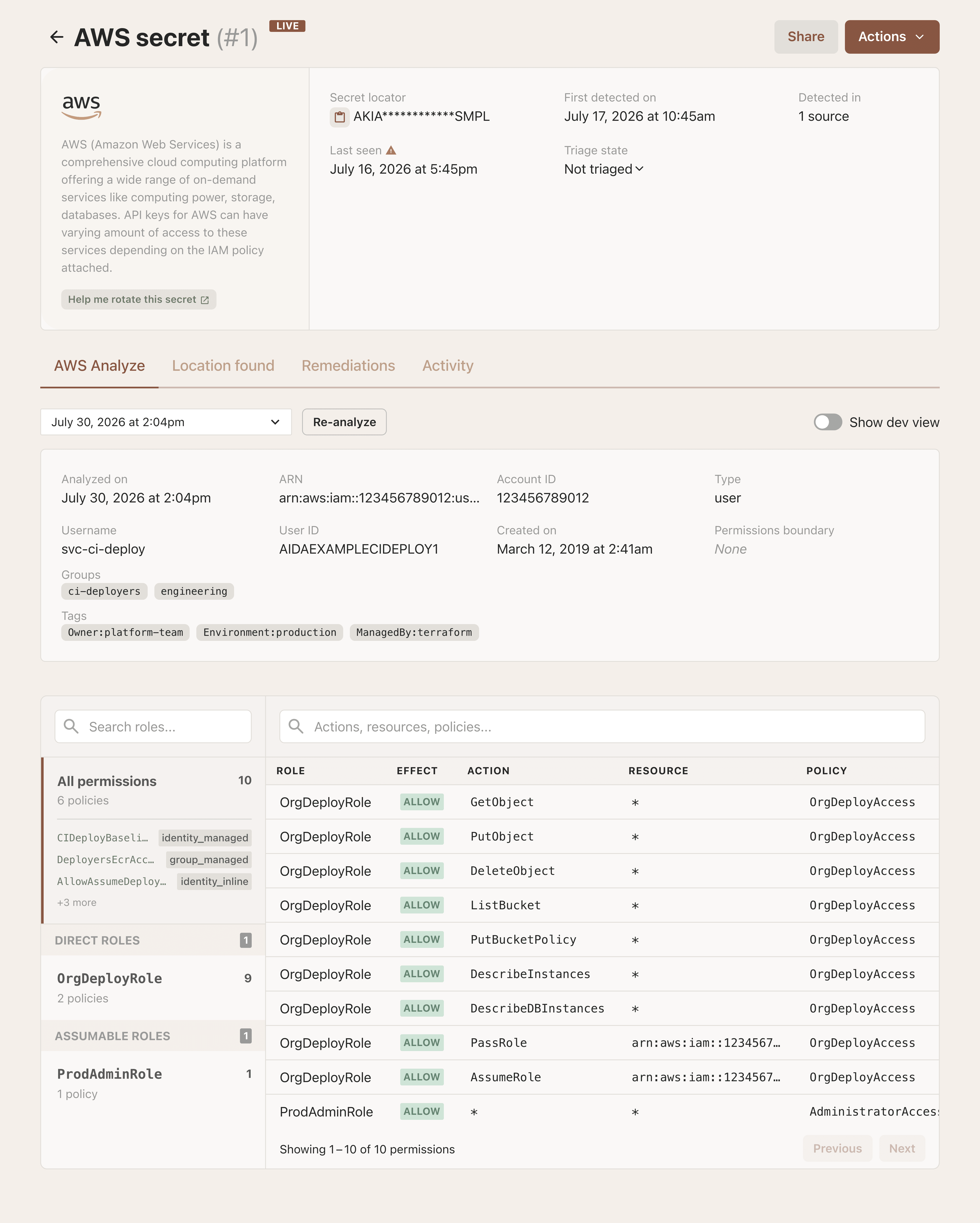
The resolved principal for a leaked key, with every permission it can reach listed underneath.
What can it do?
AWS Analyze collects managed and inline policies associated with IAM users, groups, and roles, then presents their statements for review.
Instead of gathering policies across IAM by hand, responders get the relevant identity and policy context in one focused view.
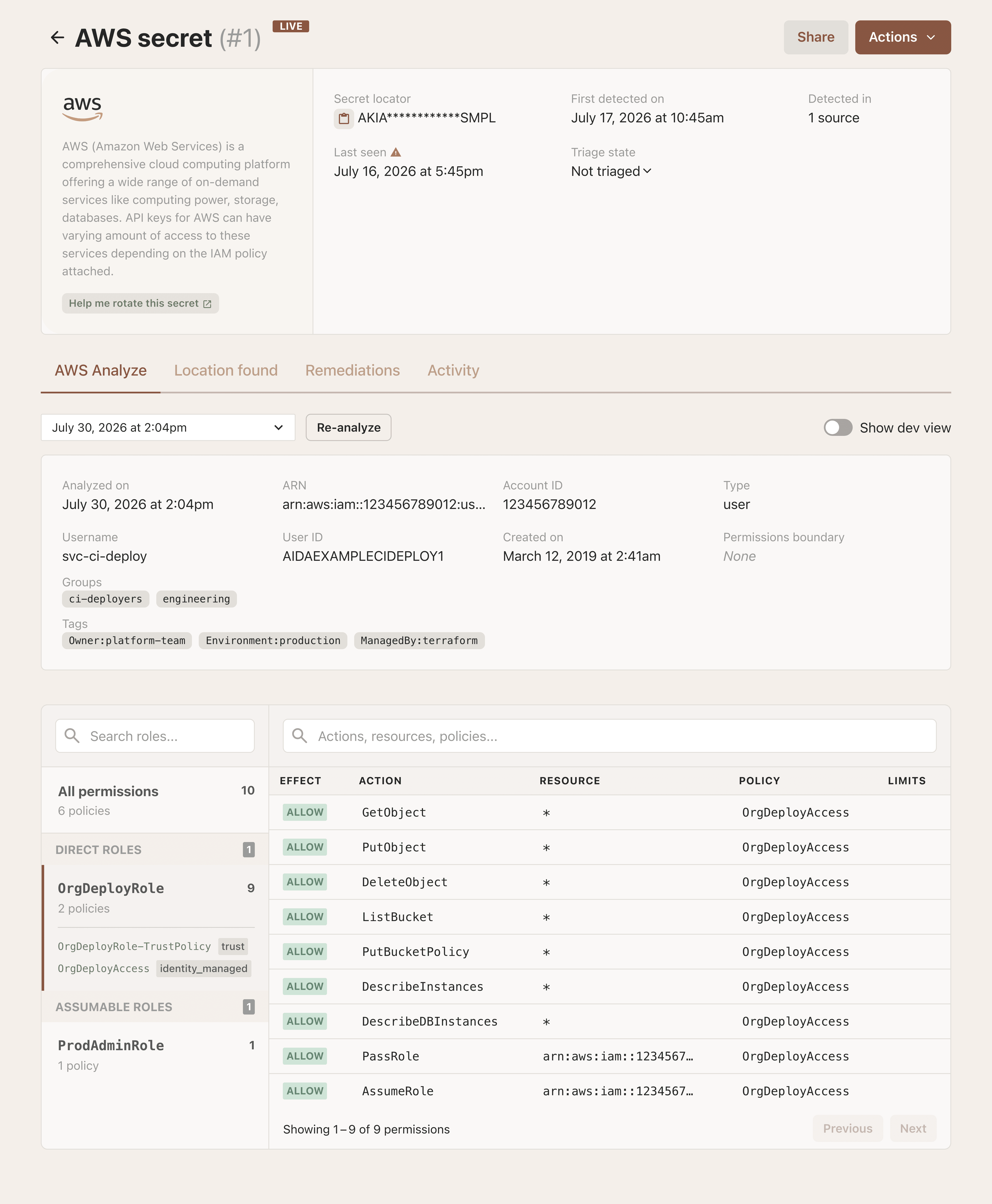
Every permission traced back to the policy statement that granted it — managed, inline, or inherited from a group.
What else can it access?
A modest-looking key may have a path to more powerful roles. AWS Analyze maps potential role paths by matching trust policies to the principal, follows one additional trust-policy hop, and collects the policies attached to those roles.
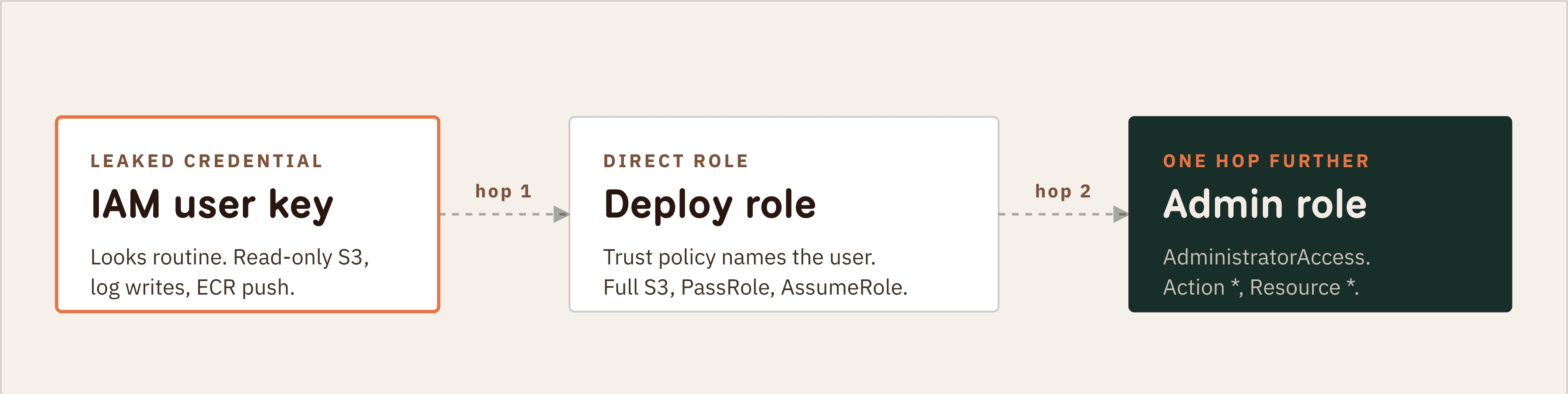
Two hops is all it takes. AWS Analyze follows the trust-policy chain so the second hop shows up in the same view as the first.
That added context helps teams see how access may extend beyond the original principal and prioritize the credentials with the broadest reach.
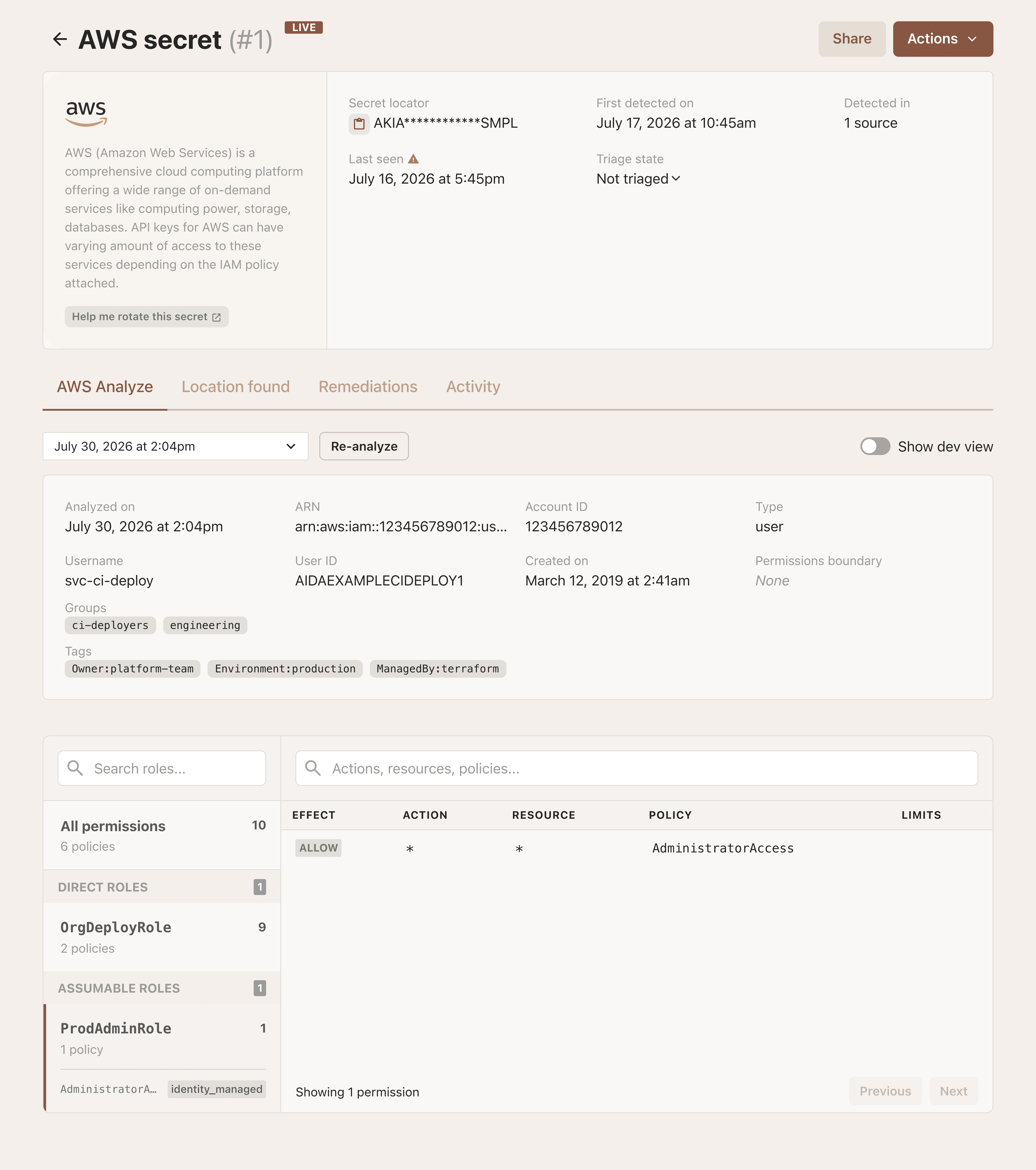
The assumable role resolves to one line — Allow · * · * via AdministratorAccess. That is the finding you want at the top of the queue.
From alert to action
By connecting identity, policies, and potential role paths, AWS Analyze turns a basic leaked-key alert into useful remediation context. Teams can quickly understand which AWS principal is involved, review the access attached to it, and focus on the findings that need attention first. When it is time to rotate a credential, our key rotation guides can help complete the next step.
Get TruffleHog AWS Analyze
AWS Analyze is available now as an add-on to TruffleHog Enterprise. Its configuration flow supports cloud and self-hosted scanners, multiple AWS integrations per tenant, and a post-save check of credentials and required permissions.
Talk to us to get started. Finding the secret is step one. Knowing what it can access is how you fix it.