
This month’s TruffleHog Enterprise release makes broad secret discovery more targeted and more dependable. Focused S3 scanning lets teams choose the object-key prefixes and file extensions worth scanning and avoid unnecessary downloads. OAuth2 authentication for custom verification means secrets can be verified through services behind your identity provider. And a set of Jira and Confluence reliability improvements helps Enterprise scans fail fast on misconfiguration and handle rate limits without stalling.
Focused, Faster S3 Scanning
The AWS S3 integration can now focus a scan on the parts of a bucket that matter. Configure prefixes to include or exclude and file extensions to include or exclude.
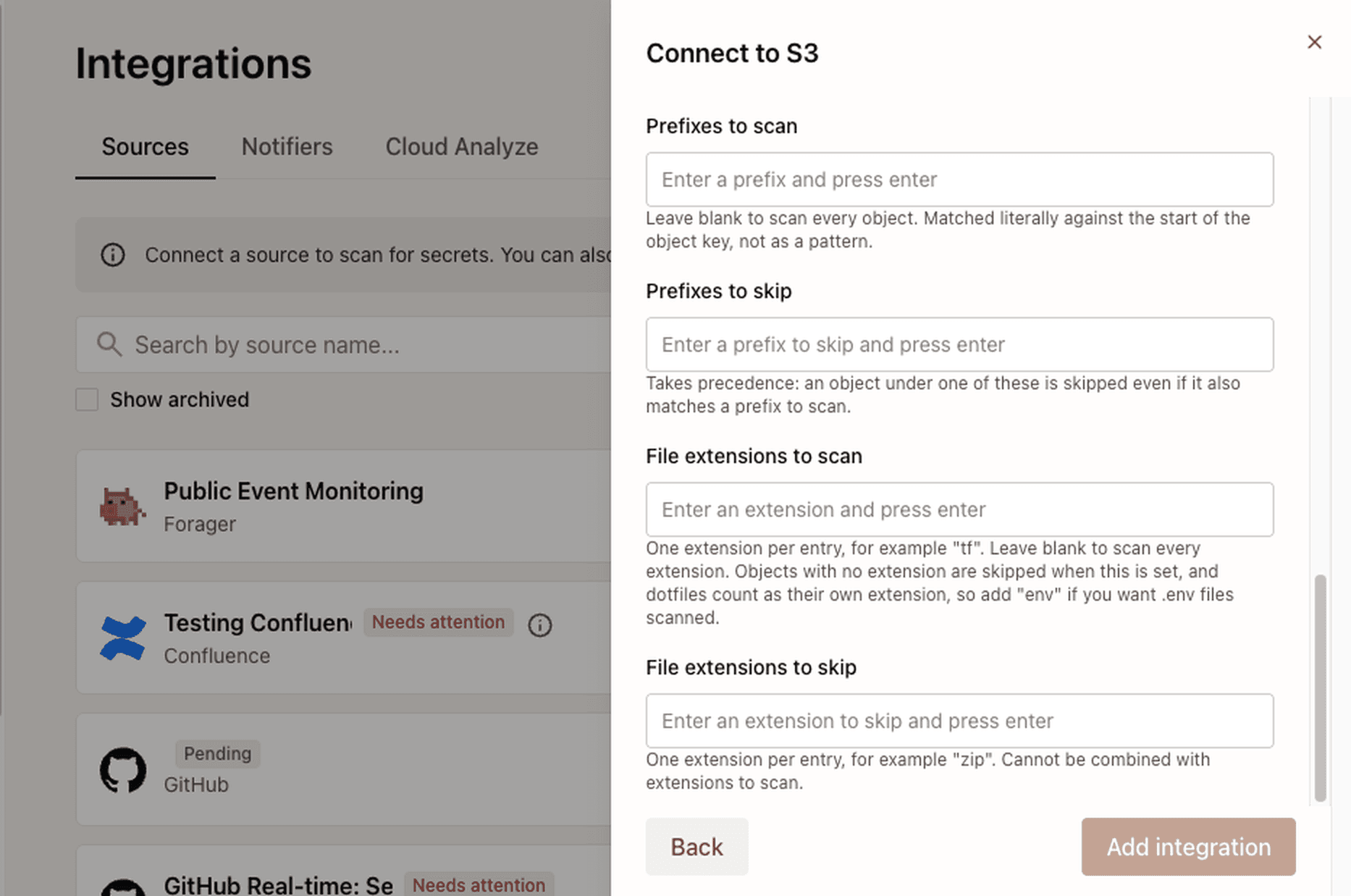
S3 object filters in TruffleHog Enterprise.
What’s new
S3 integrations now support four object filters: prefixes to scan, prefixes to skip, file extensions to scan, and file extensions to skip. For example, a team can include
configs/anddeployments/, excludeconfigs/generated/, and limit scanning to extensions such as json, yaml, and env.The same controls are available in Open Source through --include-prefix, --exclude-prefix, --include-extension, and --exclude-extension.
When a scan includes one or more prefixes, TruffleHog now asks S3 to list only the keys below those prefixes instead of paging through the entire bucket. Access validation uses the same scoped listing. That means an IAM identity restricted to an approved prefix can validate successfully without needing list access across the whole bucket.
The example above in TruffleHog Open Source. Each flag can be repeated.
The problem we’re solving
S3 buckets often contain far more than source code and configuration. Backups, media, archives, generated build artifacts, and other large objects can dominate a bucket even when they are unlikely to contain the secrets a security team is looking for.
Scanning all of that data consumes time, bandwidth, and S3 requests. It can also force teams to grant broader listing permissions than their security model allows.
Focused S3 scanning addresses both problems. Teams can narrow the scan to high-value objects and use credentials scoped to the prefixes they are allowed to inspect.
What’s happening under the hood
TruffleHog evaluates filters against the object key before downloading an object. An excluded object therefore requires no GetObject request and no secret-scanning time. Exclusions take precedence when include and exclude rules overlap.
Included prefixes are also pushed into S3’s list requests. TruffleHog sorts the configured prefixes and collapses nested entries so no object is listed or scanned twice, and resume checkpoints still work across each scoped listing, so incremental scans behave the same with or without filters.

What this unlocks
The result is broader S3 coverage that is easier to tune and easier to trust, without requiring teams to treat every object in every bucket the same way.
OAuth2 Authentication for Custom Verification
What’s new
Custom detectors and self-hosted verification endpoints can now authenticate to verification services protected by OAuth2. Add an auth block with the token endpoint and resource-owner password credentials, and TruffleHog obtains an access token before calling the verifier. Teams can also choose the header that carries the token when the detector itself already uses Authorization for the secret being verified.
An example auth block on a custom detector’s verification endpoint.
The problem we’re solving
Many organizations route internal APIs through an identity-aware proxy or gateway. A custom verification endpoint behind that boundary should not have to accept unauthenticated traffic just so a scanner can reach it.
What’s happening under the hood
TruffleHog requests an OAuth2 token from the configured HTTPS token endpoint, attaches it to verification requests, and reuses it until it expires. If the identity provider does not return an expiry, the token is refreshed after a short default lifetime. Token requests back off after failures rather than repeatedly hitting the identity provider.
When OAuth2 authentication is configured, verification for that detector uses only the endpoints explicitly listed in its configuration. The access token is attached only to those configured endpoint hosts.

How TruffleHog authenticates to a verification service protected by OAuth2.
What this unlocks
Teams can keep custom verification services behind existing authentication controls. That makes custom verification align more easily to established identity and network boundaries.
More Complete and Predictable Atlassian Scans
What’s new
Jira integrations now check endpoint reachability and credentials at scan start, so a bad URL or auth problem fails early with a clear error instead of a stalled scan. Project exclusions match keys regardless of case, and requests that keep hitting rate limits stop after a bounded retry policy rather than retrying forever.
Confluence now follows the pagination links the API returns when enumerating spaces, so permissions issues no longer cause scanning misses. Custom-domain and self-hosted instances align to configured API paths.

Jira and Confluence scan behavior, before and after this release.
The problem we’re solving
Source integrations have to work across cloud, self-hosted, proxies, and custom domains. Small assumptions about casing, pagination, or retries turn into incomplete coverage or a scan that looks stuck.
What’s happening under the hood
Jira uses one shared project-discovery path, and Data Center skips Cloud-only status calls that previously added thousands of unnecessary requests.
S3 object filtering and OAuth2-authenticated custom verification are available now in TruffleHog Enterprise and Open Source. The Jira and Confluence improvements are available in TruffleHog Enterprise. For more information, visit trufflesecurity.com/enterprise. If you would like a demo of TruffleHog Enterprise, contact our team.


