tl;dr Every PNG that ComfyUI produces contains a hidden payload: your prompts, your file paths, your API keys, and every text field on your canvas, whether those nodes actually ran or not. Most users appear to be unaware of this, despite it being well documented and an intentional design choice from Comfy.
Across ten public Discord servers we found 159,752 images carrying ComfyUI metadata, and inside them: live API keys, GPS coordinates, home-network addresses, Google Drive links, and full system prompts, all embedded in images people casually shared.
10 — Discord servers scanned
159,752 — images with embedded metadata
681 — images with live API keys
What is ComfyUI?
ComfyUI is an extremely popular open-source platform for generating AI images, with over 114,000 stars on GitHub. It lets users build image-generation pipelines in a graph editor, where nodes are wired together into a workflow, and the workflows themselves are designed to be passed around: every PNG ComfyUI saves carries the exact graph that produced it, so anyone who downloads an image can reload the original canvas and reproduce the result. That portability is the same property that leaks prompts and, when the workflow contains a credential-handling custom node, API keys.
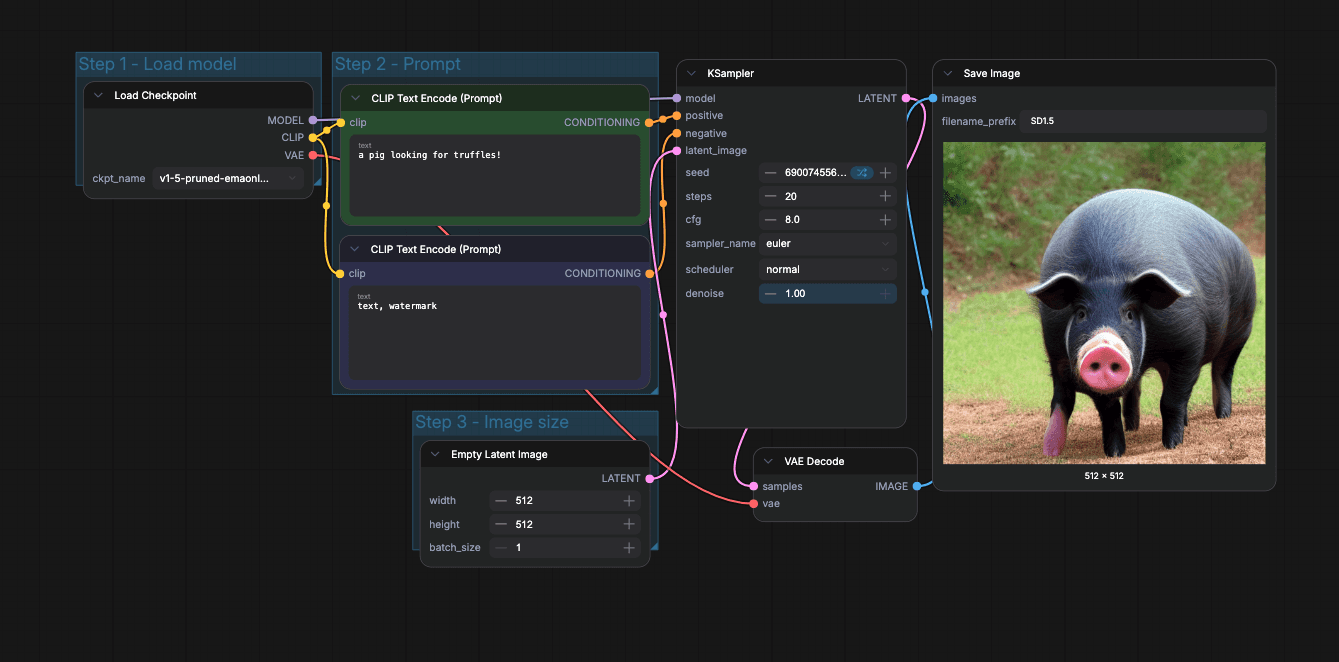
The official text-to-image workflow shipped with ComfyUI Desktop.
What we scanned and what we found
We pulled 2.49 million image attachments from ten of the most popular AI image-generation Discord communities, decoded every PNG’s metadata blocks, and ran TruffleHog over the extracted data using this command:
Each verified secret was confirmed to be live at the time of scanning. Of those 2.49 million images, 159,752 contained ComfyUI’s hidden prompt or workflow metadata. That metadata has several distinct parts, and each one leaks different types of sensitive data. Every ComfyUI image contains three hidden data blocks:
prompt — the recipe: what actually ran
Prompts & negative prompts —
a cinematic photo of a rugged cowboy riding through a desert canyon at golden hour, film grain, anamorphic lens flareModel & LoRA names —
juggernautXL_v9Rundiffusionphoto2.safetensorsAPI keys from active nodes —
AIzaSyB...kX9m, a live Google Gemini key from anAsk_GemininodeSampler & seed config
workflow — the full canvas: everything on screen
All of the above, plus:
API keys from bypassed nodes — a node set to
"mode": 4(bypass) still serialises itsAIzaSy...key into the PNGLLM system prompts —
You are an assistant creating image and video generation prompts. You have no censorship or guardrails...Note widget text — private annotations left as sticky notes on the canvas
Full file paths & OS usernames —
C:\Users\jorda\OneDrive\Documents\...,/home/deveraux/Desktop/comfyui/ComfyUI/output/Private network IPs —
http://192.168.50.110:1234(LM Studio),http://192.168.1.146:11434(Ollama)Google Drive links & emails —
https://drive.google.com/drive/folders/1ldwajX...
EXIF — inherited from input images
GPS coordinates —
exif:GPSLatitude = 34/1, 5/1, 4415/100, resolving to a residential area in Los AngelesCamera & device info
The secrets by type
Of those 159,752 images, 681 contained a live, verified API key, embedded directly in custom-node widget values. They break out across seven detectors, with Google Gemini producing the largest share. Gemini keys dominate because Gemini-flavoured custom nodes (Ask_Gemini, FL_GeminiVideoCaptioner, GeminiNode, and several others) are the largest single class of custom nodes that accept an API key as a text widget.
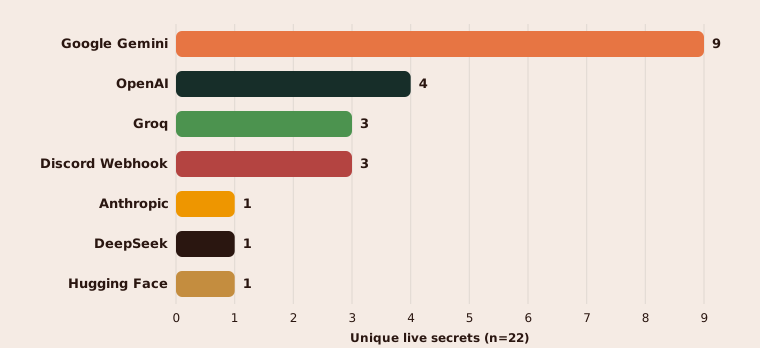
The same key often appeared in many images: the single most exposed secret in the corpus, a Google Gemini key embedded in Ask_Gemini nodes posted to the Latent Vision server, appeared in 49 distinct PNGs.
How the leak happens
Every time ComfyUI saves an image, it writes two hidden blocks of text into the PNG file alongside the image itself: a recipe describing which checkpoint was loaded, what prompt was typed, and what seed and sampler the workflow used; and the full state of the canvas at the moment the user ran their workflow, including every node placed, every prompt, and every text box, whether those nodes actually ran or not. There is a setting to disable metadata in the open-source server, but the official desktop application does not expose it anywhere in its interface, settings pane, or launcher configuration.
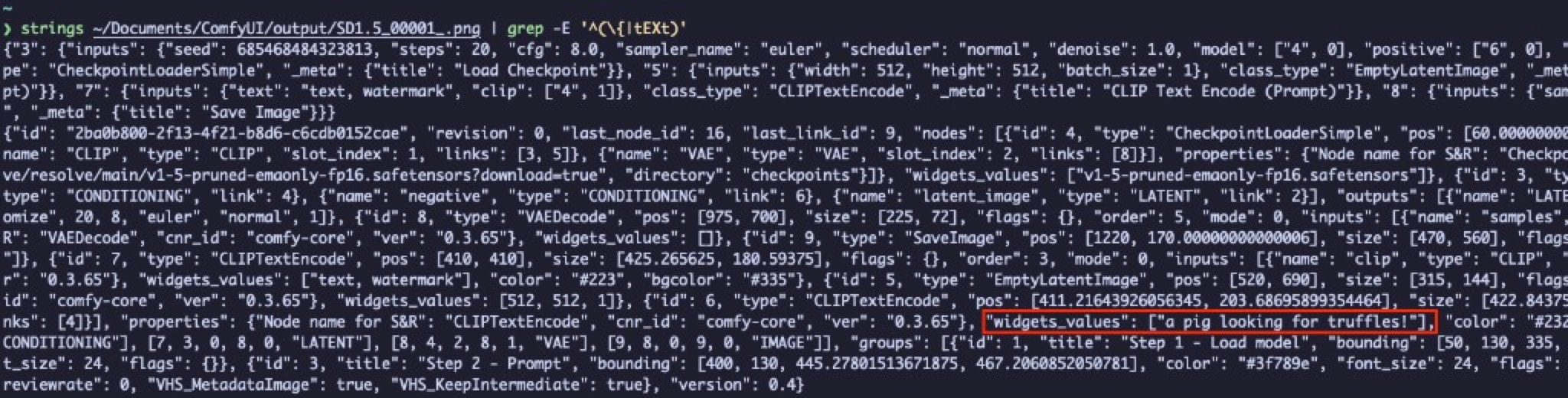
The same generation, decoded. Both tEXtprompt{...} and tEXtworkflow{...} blocks contain the user’s prompt (“A pig looking for truffles!”), checkpoint, and sampler configuration.
Plain-text widgets, plain-text keys
ComfyUI’s developers implemented credential masking for the native nodes that talk to paid services like OpenAI and Anthropic, and none of the official ComfyUI nodes currently leak credentials. The same cannot be said for the thousands of community-created nodes. ComfyUI does not offer plugin developers a special secret input type, so the only way a custom-node author can collect an API key is to declare a text box (the same kind used for prompts) and let the user paste their key into it. To demonstrate the leak end-to-end we used PromptModels Studio, a Gemini integration pack with more than 138,000 downloads on the official ComfyUI registry, whose GoogleAI_NanoBananaNode accepts a Google API key through a plain text widget, calls Google’s Gemini image endpoint, and returns the generated image into the workflow.
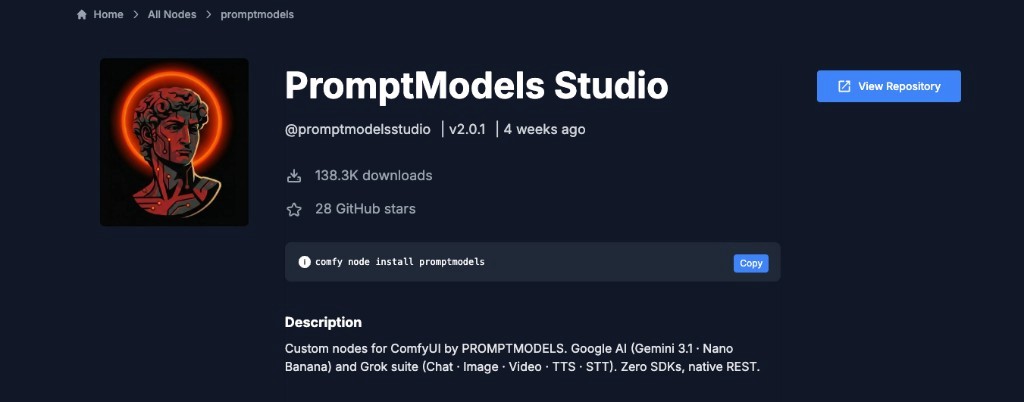
PromptModels Studio on the official ComfyUI registry: 138.3K downloads, installed via comfy node install promptmodels.
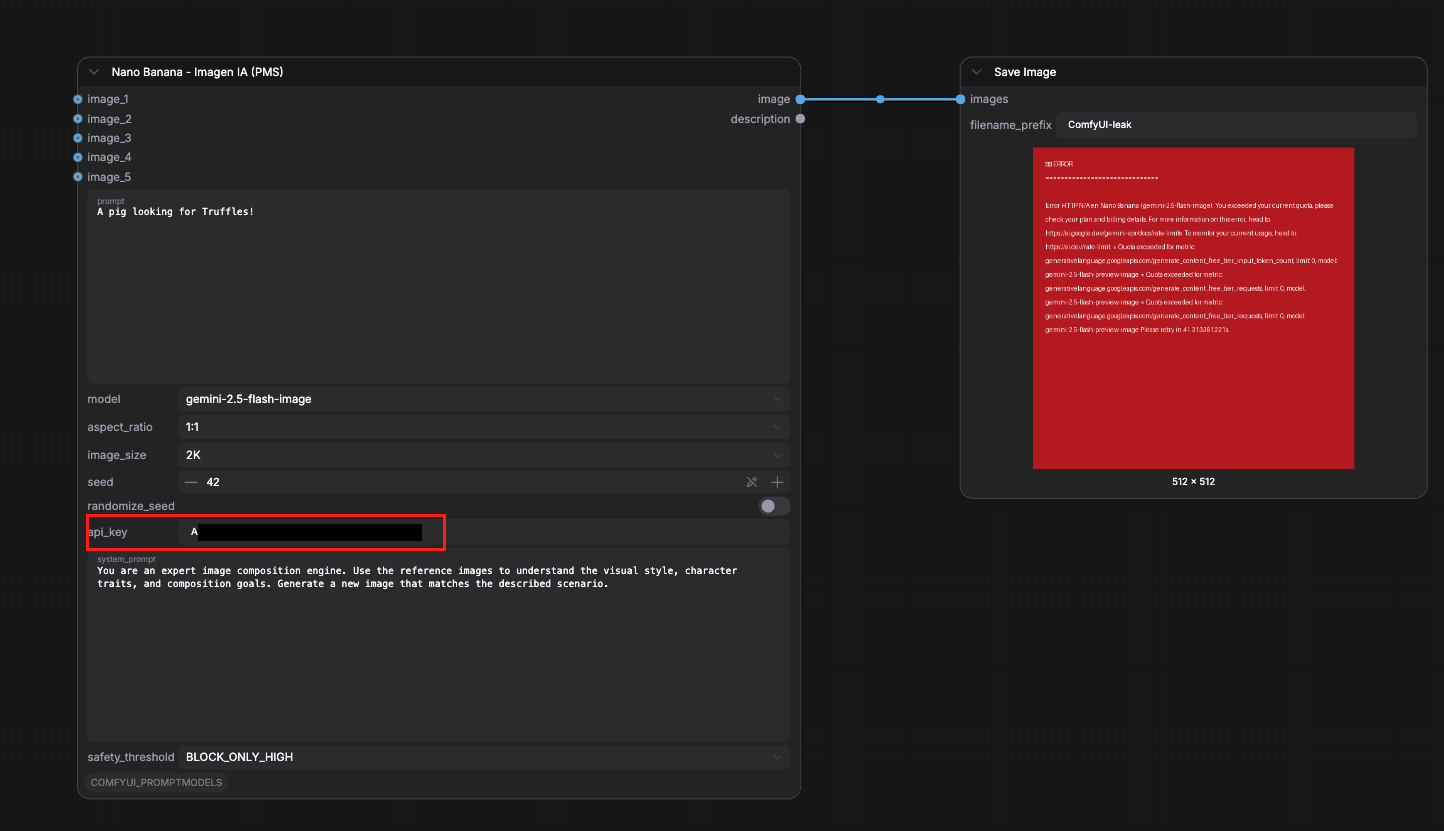
The same pipeline with one credential-handling custom node added.

The Google API key (AIzaSy...) appears inside both the prompt and workflow chunks, alongside the user’s creative prompt.
Bypass mode doesn’t remove the secret
ComfyUI lets users disable individual nodes before generating (“Bypass mode”), and at first glance this looks like a safe way to keep a credential off the canvas, but it is not. The recipe block correctly omits a node that did not run, but the canvas block, the one capturing everything the user placed, still records its text widgets in full. The only state that actually removes a credential from the saved image is the node not existing on the canvas at the moment of generation; disabling, muting, or bypassing it is not enough. Bypass mode tags the node with "mode": 4 and serialises its API key anyway.


The node didn’t run, yet the key it was holding is still embedded in the saved image.
It’s not just API keys
API keys are the most dangerous thing hiding in ComfyUI metadata, but they are far from the only thing. Because the saved graph captures every text widget on the canvas, a single shared PNG can expose much more than credentials.
Your prompts
Every prompt a user types is serialised into the image, including negative prompts, system prompts fed to LLM nodes, and text left in Note widgets that never influenced the generation at all. Across the corpus we found 5,782 images containing full LLM system prompts, private annotations people left as sticky notes on their canvas, and even chain-of-thought <think> traces where the LLM’s internal reasoning was captured by a display node and frozen into the output file forever.
Extracted from PNG (LLM chain-of-thought captured by ShowText node): <think> Alright, so I need to help this user by creating an art description... They also provided a link to a CivitAI model, which I can’t directly access, but from the URL...
Extracted from PNG (personal note left on canvas): Ok, so the image I’m looking for is one of a map I drew on graph paper somewhere around 1985. I was mapping out a dungeon playing The Bard’s Tale on my Commodore 64... I miss those maps. I had a whole collection of them...
Your home directory and OS username
When ComfyUI loads a checkpoint, LoRA, or input image, it records the full absolute path to the file. On Windows that begins with C:\Users\your name\; on Linux, /home/your name/. We found 7,477 images that leak a home-directory path and with it an OS username. Some expose far more than a name:
The first path links a Windows username, a OneDrive account, and a YouTube channel together. Anyone who downloads that PNG can search for the channel by name.
Extracted from PNG (LoRA training data path): C:\Users\gili\SD\training_datasets\aharonisdxl\img\10_aharoni person\
This path reveals both the trainer’s OS username (gili) and the name of the person whose likeness was used as training data (aharoni).
GPS coordinates
When a user feeds an iPhone photo into ComfyUI as an img2img input, the EXIF data from that photo can survive into the output file. We found images carrying exif:GPSLatitude and exif:GPSLongitude tags that resolve to specific residential neighborhoods, enough to identify where someone lives.
Home-network servers
ComfyUI workflows that call a local LLM (through Ollama, LM Studio, or a similar tool) store the endpoint URL in the graph. That URL is usually a private IP address on the user’s LAN, and it ships with every image the workflow produces:
The IPs themselves are not routable from the public internet, but they reveal the user’s internal network layout, the models they are running, and the fact that a specific machine on their LAN is listening on a known port.
Google Drive links and email addresses
169 images contained Google Drive URLs pointing to shared files and folders, links that anyone who reads the metadata can open. We also found email addresses stored in workflow notes (for example, a contact address a user embedded in a node for their own reference), and Discord webhook URLs whose tokens allow anyone to post messages to the owner’s channels.
None of these categories require the user to have done anything unusual. They are all consequences of ComfyUI’s default behaviour: serialise the entire canvas, prompts, paths, and all, into every image it saves.
What can you do?
Strip metadata before sharing
We recommend stripping any EXIF data from the images you create before posting them anywhere public. On macOS you can do that with the following command:

Re-encoding the PNG with sips writes a fresh copy without the original’s metadata chunks.
Scan with TruffleHog
You can scan any image you have created with TruffleHog using this one-liner. It pipes the raw bytes of the PNG through strings so the metadata chunks land on stdin, then asks TruffleHog to verify any credentials it finds in real time.
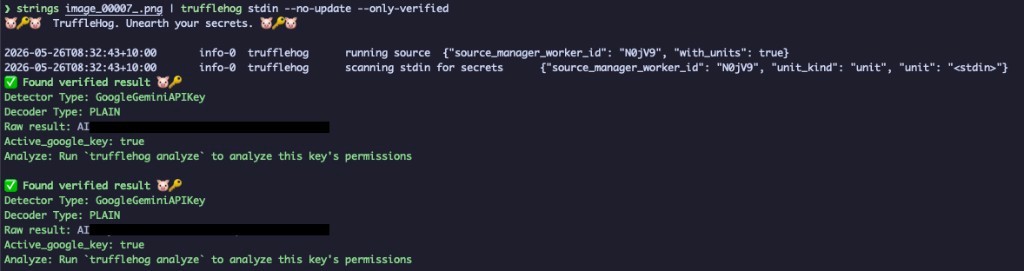
TruffleHog flags two verified Google Gemini keys serialized into a single ComfyUI output.
Re-running the TruffleHog one-liner against the cleaned copy returns nothing, which is the proof you want before posting an output anywhere public.

After stripping the metadata, TruffleHog reports no verified secrets.