Microsoft Teams
Microsoft Teams
Edition: Enterprise and Hosted scanner only
The Microsoft Teams integration scans channel messages and attachments in Microsoft Teams for credentials and other sensitive data.
Configuration
The Microsoft Teams integration is configured in TruffleHog under Integrations. Local configuration is not available for this source.
Each integration scans a single team. To scan multiple teams, create a separate integration for each.
Web configuration
Configure this integration from the Integrations page in TruffleHog. Setup requires an admin account to grant permissions during the OAuth2 flow.
The integration requires the following scope:
- ChannelMessage.Read.All — read access to messages in all public and private channels within the team. Include/exclude filters narrow this scope at scan time.
When prompted, check Consent on behalf of your organization to grant access for all users in the organization. This option only appears for admin users.
Finding your Team ID. When the integration prompts for a Team ID, it expects the Microsoft Teams group ID for the team you want to scan.
Open Microsoft Teams.
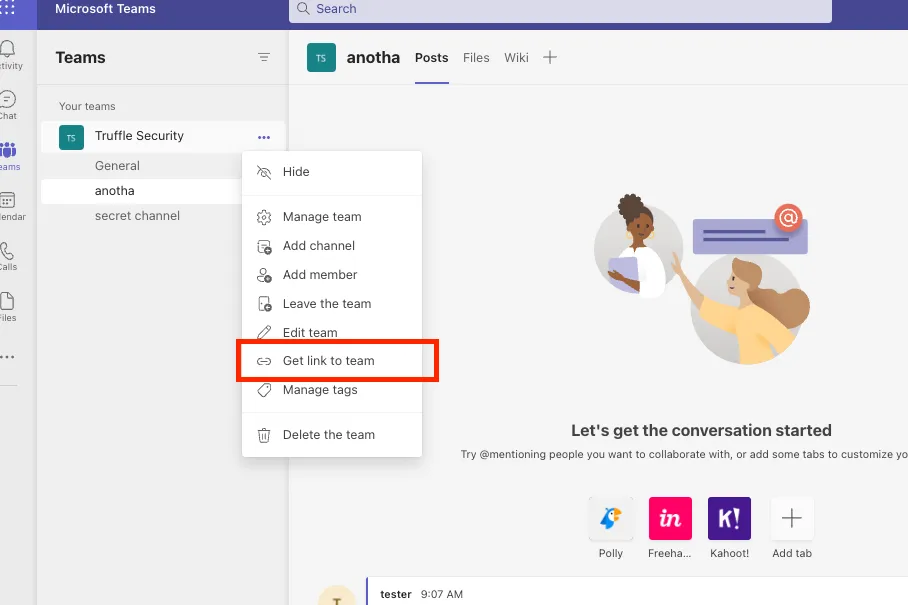
In the left pane, click the ... menu next to the team name (not a channel) and select Get link to team.
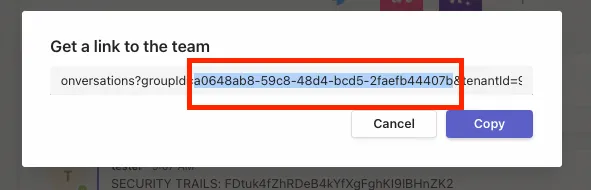
In the link that's generated, copy the value following groupId=. For example, in https://teams.microsoft.com/l/team/.../?groupId=xxxxxx&tenantId=..., the Team ID is xxxxxx.
Capabilities
Feature | Supported |
|---|---|
Scan channel messages | ✅ |
Scan private channels | ✅ |
Scan attachments | ✅ |
Scan archive files | ✅ |
Scan base64-encoded data | ✅ |
Scan binaries | ✅ |
Scan Microsoft Office files | ✅ |
Include / exclude filters | ✅ |
Auto-resume | ✅ |
Notes
- Direct messages are not scanned. The integration covers channel messages only.
- Scanning private channels requires authorization from the tenant admin during the OAuth2 flow.