Jira
This feature is only available with TruffleHog Enterprise. Contact us to learn more.
Get your TruffleHog results sent to Jira.
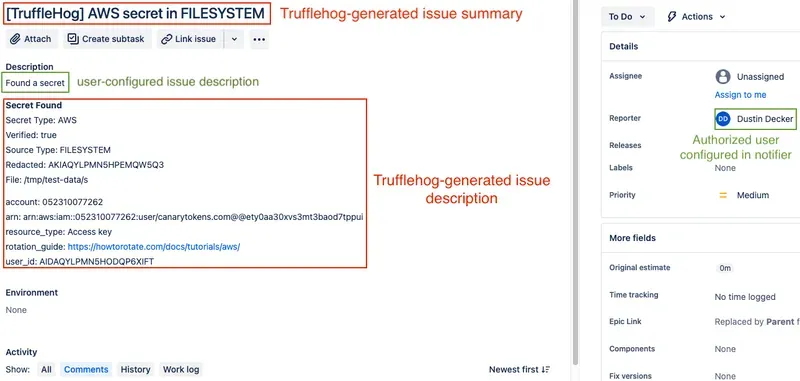
The Jira notifier will create a new Jira issue for each found secret. The issue’s summary (title) will include the secret type and source type, and the issue’s reporter will be the user configured to authenticate to Jira. The issue will be created with no assignee.
The value configured as the notifier’s issueDescription will be prepended to a text block that contains the secret type and source type, whether the secret was verified, and additional secret metadata.
You cannot set the Summary, Description, or Reporter fields as custom fields, as they are automatically set by TruffleHog itself. Attempting to do so will cause errors in the scanner.
By default, TruffleHog will not modify issues in any way after they have been created. The Jira notifier does have an opt-in, closed Beta feature to automatically close Jira Issues when it detects that a secret has been rotated. Presently, this feature is only accessible via on-prem configs. To request access to this feature, please reach out to our team with a support ticket.
The Jira notifier supports either basic authentication or token-based authentication. If possible, please use token-based authentication as it is the authentication method recommended by Atlassian.
Configuration
Web configuration
You can configure this integration via the web UI through the integrations tab or you can use a local configuration file as outlined below.
Local configuration
notifiers:
- connection:
    '@type': type.googleapis.com/notifiers.JIRA
    basicAuth:
      password: t0ken
      username: [email protected]
    customField:
    - name: customfield_10000
      value: "Security Incident"
      type: STRING
    - name: customfield_10001
      value: "5"
      type: NUMBER
    - name: customfield_10002
      value: "High Priority"
      type: SINGLE_SELECT
    endpoint: https://trufflesec.atlassian.net
    issueDescription: Found a secret
    issueType: Bug
    projectKey: SECRETS
  name: create jira tickets
  type: NOTIFIER_TYPE_JIRA
Options
Key | Description | Required |
|---|---|---|
endpoint | The endpoint of your Jira installation, on-prem or cloud. | Yes |
projectKey | The project key to file issues into | Yes |
issueType | The type of issue to file (Bug or Task are common types to use) | Yes |
issueDescription | A description that shows up before the finding information | No |
customField | An array of custom fields to include when creating the issue. Jira requires the custom field ID for the name value, see the examples above. | No |
IssueAutoClose (Closed Beta Feature) | Include this directly above remediationTransitionName, if using this feature. | No |
remediationTransitionName (Closed Beta feature) | The state that the Auto-Close feature will move tickets to rotated secrets to. This transition name usually matches the final state name in Jira. | No |
Capabilities
Feature | Supported |
|---|---|
File tickets for findings | ✅ |
Auto-close remediated findings (available as closed beta) | ❕ |
Set the leaker as the assignee | ❌ |
Assign labels to issues | ❌ |
Example
Here is a screenshot of a created Jira issue with TruffleHog-generated and user-configured values highlighted: