AWS S3
AWS S3
Edition: Enterprise + Open Source
The AWS S3 integration scans objects in S3 buckets for credentials and other sensitive data.
Prerequisites
Requirement | Detail |
|---|---|
AWS account | At least one S3 bucket to scan. |
IAM identity | An IAM user, role, or instance profile with permission to list buckets and download objects. See the example IAM policy below. |
Configuration
The AWS S3 integration can be configured in TruffleHog under Integrations, or via a local configuration file (below).
Web configuration
Configure this integration from the Integrations page in TruffleHog. You'll need an AWS access key and secret for an IAM identity with read access to the buckets you want to scan.
Local configuration
Local configuration supports four authentication modes:
- IAM credentials — uses credentials from the standard AWS credential chain. Works with IAM users, roles, or instance profiles.
- IAM role assumption — uses a base IAM identity to assume one or more roles, typically across AWS accounts. Most secure option for multi-account scanning.
- IAM role assumption with instance profile — same as role assumption, but the assuming identity is the EC2 instance profile of the scanner host.
- Static credentials — embeds an access key and secret directly in the config. Useful for testing; not recommended for production, since credentials are stored in plaintext.
IAM credentials
Use this when AWS credentials are available in one of the standard locations (environment variables, ~/.aws/credentials, or instance metadata). Compatible with IAM users, roles, and instance profiles.
IAM role assumption
Use this to scan buckets across multiple AWS accounts from a single scanner instance. A common pattern is to run the TruffleHog scanner in an administrative or security account with permission to assume IAM roles in target accounts that contain the buckets you want to scan.
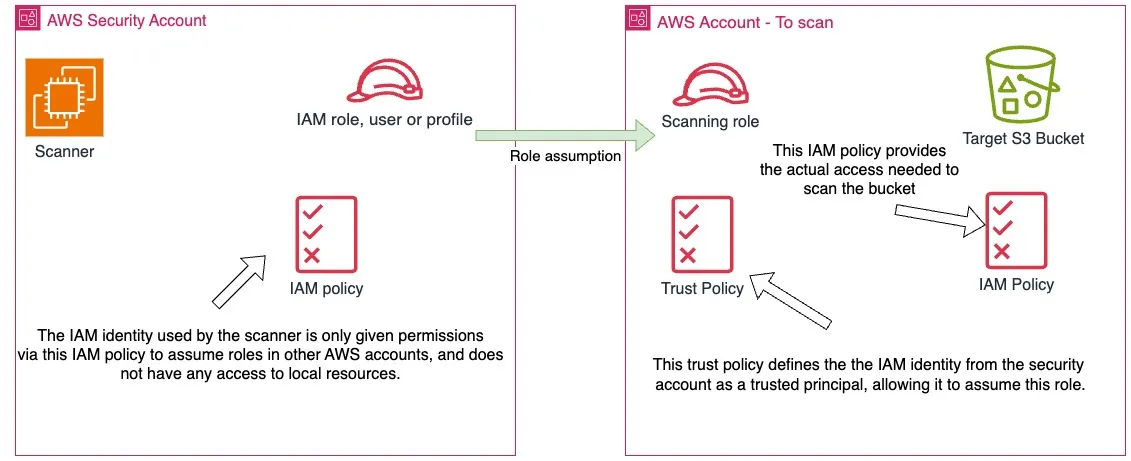
Passing a role ARN without specifying buckets scans every bucket the role can list. Multiple roles can be specified. If buckets are also supplied, each role attempts to scan each bucket.
IAM role assumption with instance profile
Same as IAM role assumption, but the assuming identity is the EC2 instance profile of the scanner host. This configuration does not use the sessionToken field.
Static credentials
Embeds an access key and secret directly in the config. Useful for testing — not recommended in production. Compatible with IAM users only.
Example IAM policy
The IAM identity used to access S3 needs the following permissions, attached either directly (for IAM credentials) or to the role being assumed (for role assumption modes):
For role assumption, the target role also needs a trust policy allowing the scanner's IAM identity to assume it:
For more on IAM roles, usage scenarios, and trust policies, see the AWS IAM documentation. For more granular S3 access control, see the AWS S3 policy examples.
Configuration options
Field | Type | Required | Description |
|---|---|---|---|
buckets | list | No | Explicit list of buckets to scan. Omit to scan all buckets the identity can list. |
ignoreBuckets | list | No | Buckets to skip during scanning. |
maxObjectSize | integer | No | Maximum object size in bytes. Objects larger than this are skipped. |
roles | list | No | List of role ARNs to assume. Required for role assumption modes. |
Capabilities
Feature | Supported |
|---|---|
Scan archive files | ✅ |
Scan attachments | ✅ |
Scan base64-encoded data | ✅ |
Scan binaries | ✅ |
Include / exclude filters | ✅ |
History | ✅ |
Versions | ✅ |
Progress info | ✅ |
Auto-resume | ✅ |
Notes
- Objects in S3 Glacier cold storage are not scanned.